Free vs Paid AI Tools: Which Is Worth Paying For?
Introduction
Artificial intelligence tools can help you write articles, summarize documents, generate images, learn new skills, analyze information, and complete everyday tasks. Many of these tools offer free access, while others provide paid subscriptions with additional features and higher usage limits.
But does paying for an AI tool always give you better results? Not necessarily.
For a student who needs occasional explanations, a free plan may be enough. A content creator who produces images every day may benefit from a paid plan with more generations and advanced editing features. Similarly, a professional who regularly analyzes long documents may need capabilities that are limited in a free version.
The right choice depends on your work, budget, usage frequency, and the features you actually need.
In this guide, you will learn the differences between free and paid AI tools, what to check before subscribing, which users may benefit from upgrading, and how to avoid spending money unnecessarily.
1. What Are Free and Paid AI Tools?
AI tools use artificial intelligence to help users complete tasks such as writing, research, design, coding, and data analysis.
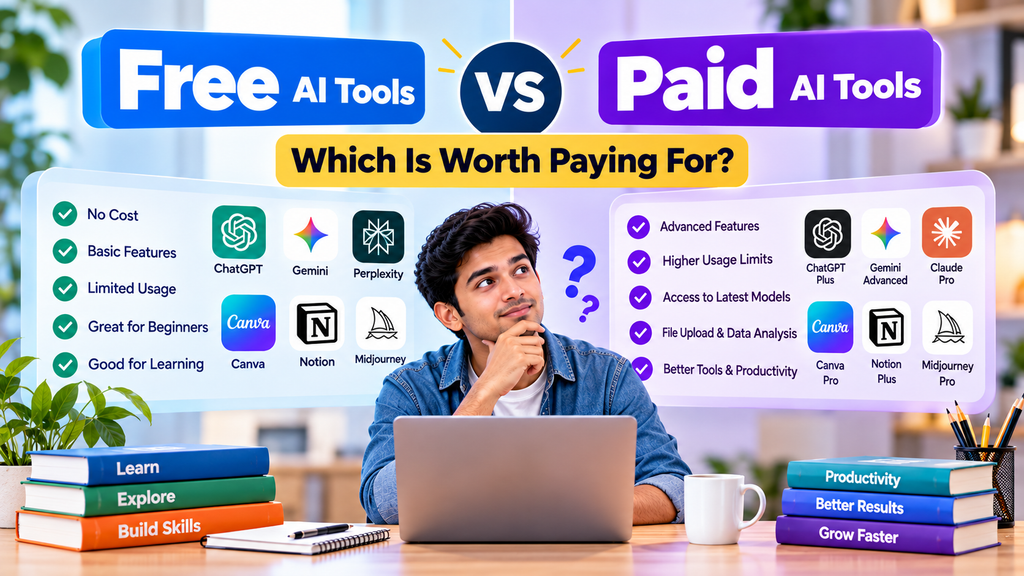
A free AI tool or free plan lets you use some features without paying a subscription fee. Depending on the provider, access may have daily or monthly limits, fewer advanced features, or restrictions on file uploads and image generation.
A paid AI plan usually offers a combination of additional capabilities, higher usage limits, access to more advanced models, or improved productivity features. The exact benefits vary by provider and subscription.
For example, you might use a free AI chatbot to brainstorm article ideas. If you later need to analyze many documents, work with larger files, or complete frequent tasks, a paid plan might be worth considering.
Important: Free does not always mean low quality, and paid does not automatically mean better for every user. Evaluate each plan based on your needs rather than its price alone.
2. Free vs Paid AI Tools: Key Differences
The following table explains common differences. These are general patterns, not guarantees about every tool.
| Feature |
|---|
| Cost |
|---|
| Usage limits |
|---|
| AI models |
|---|
| File uploads |
|---|
| Image generation |
|---|
| Speed and availability |
|---|
| Collaboration |
|---|
| Support |
|---|
| Privacy and data controls |
|---|
| Free AI Plans |
|---|
| Usually no subscription fee |
|---|
| May have lower limits |
|---|
| May include selected models |
|---|
| Availability or limits may vary |
|---|
| May be limited or unavailable |
|---|
| Can vary with demand and plan |
|---|
| Depends on the product |
|---|
| Varies by provider |
|---|
| Depend on provider and settings |
|---|
| Paid AI Plans |
|---|
| Monthly or annual fee may apply |
|---|
| Often higher limits |
|---|
| May provide additional or advanced models |
|---|
| May offer higher limits or additional capabilities |
|---|
| May provide more generations or advanced features |
|---|
| Some plans offer priority access |
|---|
| Some plans include team or workplace features |
|---|
| Some subscriptions offer additional support |
|---|
| May offer different controls, especially for business plans |
|---|
Always check the current plan details before making a purchase. Providers can change their features, limits, prices, and terms.
3. Advantages of Using Free AI Tools
Free AI tools are a practical starting point for beginners. You can learn how AI works, experiment with prompts, and discover whether a tool is useful before spending money.
1. No Subscription Cost
The biggest advantage is that you can start without committing to a recurring payment.
This is helpful for students, beginners, hobbyists, and people who only use AI occasionally.
2. Good for Learning and Experimenting
You can practice asking questions, generating outlines, simplifying difficult concepts, and brainstorming ideas.
For example, a student might ask an AI tool to explain a science topic in simpler language or create practice questions from their notes.
3. Suitable for Occasional Tasks
If you only need help with a few emails, short summaries, or occasional ideas, a free plan may provide everything you need.
4. Helps You Compare Tools
Trying free access can help you compare the quality, interface, supported languages, and workflow of different tools before choosing one.
Limitations of Free Plans
Free plans can still have restrictions. You may encounter usage caps, unavailable features, limited file processing, or temporary access limits during busy periods.
These restrictions do not necessarily make a free tool unsuitable. They simply mean you should check whether it supports your specific task.
4. Advantages of Paid AI Tools
Paid plans can be useful when AI becomes a regular part of your work and free access no longer meets your needs.
1. Higher Usage Limits
Some paid plans allow more messages, file analysis, image generations, or other operations.
This can help users who complete many AI-assisted tasks throughout the week.
2. Access to Additional Capabilities
Depending on the provider, paid access may include more advanced models, additional tools, larger context limits, or more sophisticated workflows.
Check the exact plan because not every paid subscription includes every advanced feature.
3. More Convenient Workflows
Some subscriptions provide integrations, project features, collaboration options, or other capabilities that reduce repetitive work.
For example, a professional who regularly prepares reports may benefit from a tool that works with their existing documents and workflow.
4. Potential Time Savings
If a paid feature consistently saves enough time to justify its cost, the subscription may be worthwhile.
However, time savings depend on your tasks and how effectively you use the tool. A paid subscription is not automatically more productive.
Limitations of Paid Plans
Paid tools still make mistakes, can produce inaccurate information, and may have usage restrictions. A subscription does not remove the need to verify important facts or protect confidential information.
Before subscribing, understand the billing cycle, renewal terms, cancellation process, applicable taxes, and any usage limits.
5. Which AI Tools Should You Try for Free First?
You do not need to pay for every AI tool. Start by matching a tool to a specific task.
ChatGPT for Writing and Learning
ChatGPT can help with brainstorming, explanations, outlines, drafting, and many other tasks, depending on the features available to your account.
Start with free access if you need occasional help. Consider upgrading only if you regularly hit limits or need a feature included in a paid plan.
Read our ChatGPT beginner’s guide to learn more.
Google Gemini for Everyday Assistance
Google Gemini can assist with writing, explanations, brainstorming, and supported file-related tasks.
Try the available free features first. Check whether your account supports the specific capabilities you need before deciding whether to pay.
See our Google Gemini AI guide.
Perplexity AI for Research
Perplexity is designed around answering questions using web-based information and sources, subject to its current features and access limits.
Free access may be sufficient for occasional research. Users who regularly need additional research capabilities may wish to compare the available paid plans.
Read our Perplexity AI beginner’s guide.
Canva AI for Design
Canva provides design tools and AI-assisted features for creating visual content. Availability and limits vary by feature and plan.
If you only create a few graphics, start with the free options. Consider paying only if a particular premium feature is important to your workflow.
Explore our Canva AI guide.
Gamma AI for Presentations
Gamma helps users create presentations and other visual content with AI-assisted workflows.
Try the available features with a small project before subscribing. Upgrade only if the current paid plan provides a feature or usage allowance you genuinely need.
6. When Is a Paid AI Subscription Worth It?
Use these examples to decide whether an upgrade may be useful.
Students
A student who occasionally needs explanations, study questions, or help understanding a topic may be able to use free AI access.
A paid plan might be useful if the student regularly needs specific advanced capabilities, larger file limits, or more usage. The subscription should fit their budget and study requirements.
AI-generated answers must still be checked against textbooks, course materials, and teachers’ instructions.
Bloggers and Content Creators
Bloggers may use AI to brainstorm topics, develop outlines, improve drafts, or organize research.
A free plan may be sufficient for a new blogger who publishes occasionally. A paid plan may become useful when usage limits interrupt a consistent workflow or when a particular advanced feature saves meaningful time.
AI should support original research, useful explanations, and editorial judgment rather than replace them.
Freelancers
Freelancers may use AI for permitted tasks such as organizing research, brainstorming, drafting proposals, or summarizing non-confidential material.
Before paying, estimate how often the tool will be used and whether it improves the work enough to justify its cost.
Always follow client confidentiality requirements and verify the final deliverable.
Small Business Owners
Business owners may use AI to help prepare marketing drafts, organize ideas, or analyze suitable documents.
A paid plan could be appropriate when the required features, collaboration controls, or business data protections justify the expense. Review the provider’s actual privacy and data terms before uploading business information.
Image and Video Creators
Creators who generate or edit visual content frequently may benefit from paid access if it provides the required generation limits, editing features, export options, or licensing terms.
Before purchasing, check what commercial use is permitted and whether the output can be used for your intended project.
7. How to Decide Whether to Upgrade
Follow this simple process before spending money.
Step 1: Identify your main task. Write down the job you want the AI tool to perform, such as researching articles, creating images, or analyzing PDFs.
Step 2: Try the free version. Use it on a real task and note what works well and what does not.
Step 3: Identify the exact limitation. Are you running out of usage, missing an essential feature, or spending too much time on a repetitive process?
Step 4: Compare plans. Review current prices, features, usage limits, billing terms, and cancellation conditions on the provider’s official website.
Step 5: Calculate the value. Estimate how much time or effort the paid feature would save and whether that benefit justifies the expense.
Step 6: Make a small, deliberate commitment. If possible, test one subscription for a clearly defined period. Avoid subscribing to several tools at once without a specific need.
Step 7: Review the result. If the paid plan does not provide enough value, consider cancelling or returning to free access according to the provider’s terms.
8. Common Mistakes to Avoid
Mistake 1: Paying for Too Many AI Tools
Several subscriptions can quickly become expensive. Choose tools based on tasks rather than subscribing to every popular product.
Mistake 2: Assuming Paid Means Perfect
Paid AI can still produce errors, outdated information, and misleading explanations. Verify important claims and calculations.
Mistake 3: Ignoring Usage Limits
A paid plan may still have caps or restrictions. Read the current plan details before relying on it for important work.
Mistake 4: Forgetting Automatic Renewal
Check whether your subscription renews automatically, when billing occurs, and how to cancel.
Mistake 5: Ignoring Privacy
Do not upload passwords, private records, confidential client files, or sensitive personal information without understanding the tool’s data policies and your responsibilities.
Mistake 6: Using AI Without Adding Value
For articles, reports, and other published work, AI output should be reviewed, fact-checked, and improved. The goal should be a useful result, not simply a large volume of generated content.
9. A Simple 7-Day Plan to Choose the Right AI Tool
Day 1: Choose one task you want to improve.
Day 2: Try a free AI tool on that task.
Day 3: Test a second suitable tool if you need a comparison.
Day 4: Check the accuracy and usefulness of both results.
Day 5: Identify any free-plan limitations that actually affect your work.
Day 6: Compare current paid plans only if an important limitation remains.
Day 7: Decide whether free access is sufficient or a paid plan offers clear value.
You do not need to buy a subscription at the end of this plan. If free access meets your needs, continue using it.
10. Frequently Asked Questions
Are free AI tools good enough for beginners?
Often, yes. Free access can be a good way to learn, experiment with prompts, and complete occasional tasks. Whether it is enough depends on the tool and your requirements.
Are paid AI tools always better than free tools?
No. Paid plans may offer additional features or higher limits, but a free tool can be the better choice when it already meets your needs.
Which AI tool is best for students?
The right tool depends on the subject, language, available features, and study requirements. Compare tools using a real study task and verify their answers against trusted learning materials.
Should bloggers pay for AI tools?
Not necessarily. New bloggers can often begin with free tools. Paying may make sense later if a particular feature saves enough time or supports a regular workflow.
Can I use free AI tools for commercial work?
It depends on the tool’s current terms, the type of output, and the intended use. Review the provider’s licensing and usage conditions before using generated material commercially.
Do paid AI tools guarantee accurate answers?
No. Paid AI systems can still make mistakes. Check important information against reliable sources, especially when publishing articles or making business decisions.
Can I cancel a paid AI subscription?
Cancellation options and timing depend on the provider and billing method. Review the official cancellation instructions and renewal terms before subscribing.
Is it worth paying for more than one AI tool?
It may be worthwhile if different tools serve distinct, necessary purposes. Otherwise, start with one tool and add another only when you can identify a clear benefit.
Conclusion
Choosing between free and paid AI tools is not about buying the most expensive plan. It is about finding a tool that fits your needs, budget, and workflow.
Free plans are often a sensible starting point for students, beginners, and occasional users. Paid plans may be worthwhile for frequent users who need additional capabilities, higher usage limits, or specific professional features.
Start with a real task, test the free version, identify any limitations, and compare the current paid options before making a decision.
The best AI tool is the one that helps you achieve your goal reliably and responsibly without spending more than necessary.