How to Use ChatGPT: A Beginner’s Guide
Artificial intelligence is becoming a useful part of everyday life. From writing emails and learning new skills to organizing daily tasks, AI assistants can help people save time and explore new ideas.
One popular AI assistant is ChatGPT. However, if you are new to AI, you may not know where to start or how to use it effectively.
In this beginner-friendly guide, you will learn how to use ChatGPT for everyday tasks, explore practical examples, and discover simple tips for getting more useful results.
What Is ChatGPT?
ChatGPT is an AI assistant that can respond to questions and instructions using natural language. You can use it to brainstorm ideas, explain concepts, draft text, organize information, and assist with many other tasks.
You do not need programming skills to get started. Simply describe what you want help with, provide relevant details, and review the response.
ChatGPT can make mistakes, so important information should always be checked before you rely on it.
1. Use ChatGPT for Writing Emails
Writing a clear and professional email can take time, especially when you are unsure how to phrase your message.
ChatGPT can help you prepare a first draft, improve your wording, or adjust the tone of an existing email.
Example prompt:
“Write a polite email asking a customer to confirm their order details. Keep it professional, friendly, and under 120 words.”
You can also ask ChatGPT to make an email shorter, more formal, or easier to understand.
Tip: Review the final message and check names, dates, and other details before sending it.
2. Learn New Topics More Easily
ChatGPT can explain unfamiliar subjects in simple language and provide examples based on your current knowledge.
For example, you can ask it to explain artificial intelligence, digital marketing, computer basics, or other subjects you want to understand.
Example prompt:
“Explain artificial intelligence to a complete beginner. Use simple English, give three everyday examples, and finish with five questions to test my understanding.”
You can follow up with questions such as “Explain that more simply” or “Give me another example.”
This makes ChatGPT useful as a learning assistant, although it should not replace reliable educational sources or expert guidance when those are needed.
3. Generate Ideas for Your Projects
Sometimes the hardest part of starting a project is deciding what to do first.
ChatGPT can help brainstorm ideas for blog posts, small businesses, social media content, presentations, and personal projects.
Example prompt:
“Suggest 15 beginner-friendly blog article ideas about AI tools. Organize them into tutorials, tool reviews, productivity tips, and practical use cases.”
Instead of accepting every suggestion, select ideas that match your audience and goals.
You can also ask ChatGPT to compare ideas based on difficulty, usefulness, or the resources required.
4. Plan Your Daily Tasks
If you have several tasks to complete, ChatGPT can help turn a long list into a more organized schedule.
You can provide your available time, deadlines, and priorities to create a practical starting plan.
Example prompt:
“Help me organize these tasks into a daily schedule. I have four hours available. Put urgent tasks first, include short breaks, and leave 30 minutes for unexpected work.”
The result can help you see what may fit into your day.
Remember that the schedule is a suggestion. Adjust it according to your actual workload, energy, and changing priorities.
5. Improve Your Writing
ChatGPT can help make writing clearer and easier to read. This is useful for students, bloggers, professionals, and anyone who writes regularly.
You can ask it to:
- Correct grammar and spelling.
- Simplify complicated sentences.
- Improve paragraph structure.
- Suggest clearer headings.
- Adjust the tone for a particular audience.
Example prompt:
“Improve the clarity and grammar of the following paragraph. Preserve its original meaning, use simple English, and explain the main changes you made.”
Always review the edited version to ensure that it still reflects your intended meaning and voice.
6. Create a Study or Learning Plan
Learning a new skill becomes easier when you break it into smaller steps.
ChatGPT can help create a study plan based on your experience level, available time, and learning goals.
Example prompt:
“Create a 14-day beginner plan for learning the basics of AI tools. I can study for 30 minutes each day. Include one learning objective and one practical exercise for every day.”
You can ask for revision questions, practice exercises, or explanations of difficult concepts.
For important academic work, use ChatGPT to support your learning rather than submitting unreviewed AI-generated answers as your own work.
7. Get Help With Everyday Problems
ChatGPT can help you organize information and think through common, low-risk problems.
For example, you might use it to create a packing checklist, plan a simple household routine, compare possible approaches to a project, or prepare questions for a meeting.
Example prompt:
“Create a checklist for preparing for a two-day trip. Organize it into clothing, documents, electronics, personal items, and things to do before leaving home.”
Providing relevant context usually makes the result more useful.
For medical, legal, financial, or other high-stakes decisions, verify information with qualified professionals and trusted sources.
8. Use ChatGPT to Understand Information
Sometimes you may have a long passage of text that is difficult to understand quickly.
ChatGPT can help summarize material, explain unfamiliar terms, or organize key points.
Example prompt:
“Summarize the text below in five bullet points. Use simple English, preserve the important facts, and identify any points that may need further verification.”
For accurate results, provide the relevant text and explain what you need from it.
Check the summary against the original source, especially when the information is important or contains detailed figures.
How to Get Better Results From ChatGPT
You do not need complicated techniques to improve your results. Start with these simple practices.
Be Clear About Your Goal
Explain exactly what you want ChatGPT to do instead of using a vague instruction.
Provide Useful Context
Mention your audience, purpose, experience level, or any relevant limitations.
Specify the Format
Tell ChatGPT whether you want a list, table, email, explanation, or step-by-step guide.
Improve the Response With Follow-Up Questions
If the first answer is not quite right, ask ChatGPT to simplify it, add examples, or explain a particular point in more detail.
Check Important Information
AI responses can include incorrect or outdated claims. Verify important details before using or sharing them.
Is ChatGPT Free to Use?
ChatGPT offers a free option, but the features and usage limits available to users may change over time.
Some capabilities may have separate limits or require a paid plan. Check the official website for the latest information before deciding whether to upgrade.
Official website: https://chatgpt.com/
Is It Safe to Use ChatGPT for Everyday Tasks?
ChatGPT can be useful for everyday assistance, but you should use it thoughtfully.
Avoid entering passwords, payment details, confidential business information, or private personal data unless you have carefully reviewed the service’s privacy terms and settings.
Before publishing AI-assisted content, review it for accuracy, originality, relevance, and usefulness. You should also check the rights and licensing conditions for any images or other assets you use.
Frequently Asked Questions
Can beginners use ChatGPT easily?
Yes. Beginners can start by asking simple questions or giving clear instructions in everyday language. You can gradually learn to provide more context as you become comfortable with the tool.
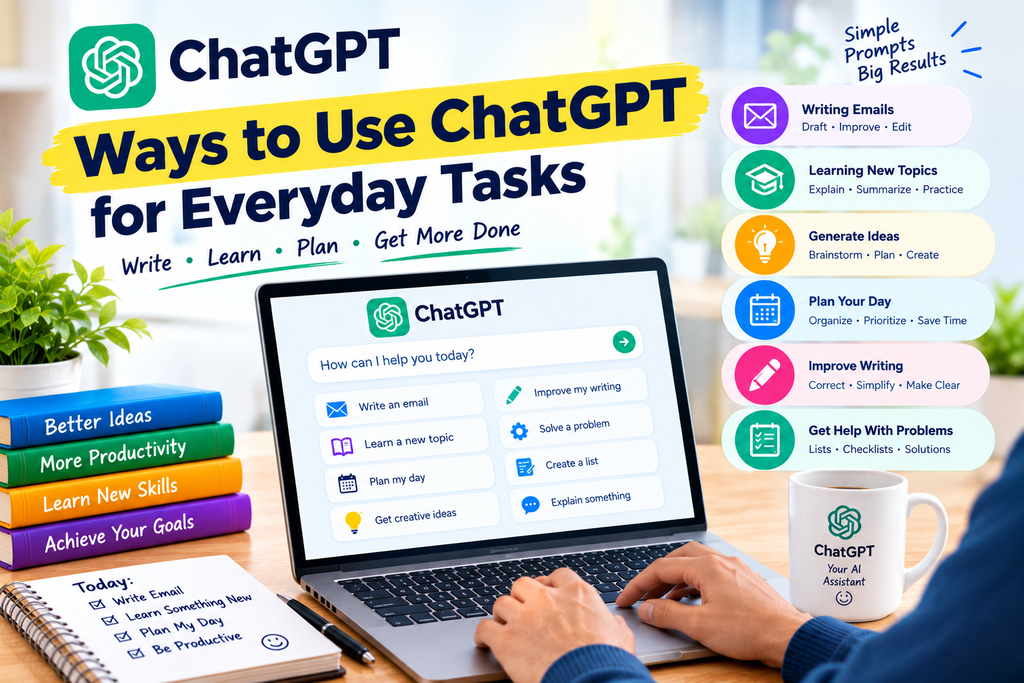
What can I use ChatGPT for every day?
You can use it to draft emails, learn new topics, brainstorm ideas, organize tasks, improve writing, and prepare checklists. The usefulness of the results depends on the task and the instructions you provide.
Does ChatGPT always give correct answers?
No. ChatGPT can make mistakes, misunderstand questions, or provide outdated information. Verify important claims using reliable sources.
Do I need technical knowledge to use ChatGPT?
No. Most everyday tasks do not require programming or technical expertise. A clear question and relevant context are often enough to get started.
Can ChatGPT help with blogging?
Yes. It can help brainstorm topics, develop outlines, explain concepts, and edit drafts. Bloggers should add their own judgment, verify facts, and create content that genuinely helps readers.
Conclusion
ChatGPT can be a useful assistant for writing, learning, planning, brainstorming, and other everyday tasks. You do not need to master advanced AI techniques before you start using it.
Begin with one task you want to make easier. Write a clear prompt, review the response, and refine your instructions when necessary.
With regular practice and careful fact-checking, you can learn where ChatGPT is helpful and where human judgment remains essential.
Explore more beginner-friendly AI guides on AIToolsNv to learn practical ways to use artificial intelligence in everyday life.