Best Free AI Coding Tools for Beginners
Introduction
Learning to code has become easier with the help of artificial intelligence. In the past, beginners often had to spend hours searching for programming examples, understanding error messages, and correcting mistakes. Today, AI coding tools can help explain code, suggest solutions, generate functions, and guide users through programming projects.
The good news is that you do not always need to purchase expensive software to get started. Several AI coding tools offer free plans or free software that beginners can explore while learning programming.
In this guide, we will compare some of the best free AI coding tools for beginners, including GitHub Copilot, Cursor, Amazon Q Developer, Replit, and Cline. We will explain their features, advantages, limitations, and the types of users who may benefit from each tool.
Whether you want to learn Python, build a website, understand JavaScript, or create a simple application, this guide will help you choose a suitable starting point.
What Are AI Coding Tools?
AI coding tools are software applications that use artificial intelligence to assist with programming. They can understand natural-language instructions and provide code suggestions, explanations, debugging help, and other development assistance.
For example, a beginner might ask an AI coding assistant:
“Write a simple Python program that calculates the total price of three products.”
The tool may generate a code example and explain how it works. You can then run the code, test it, and ask follow-up questions if something is unclear.
Common features of AI coding tools include:
- Code generation: Create code from written instructions.
- Code completion: Suggest the next lines or expressions while you type.
- Debugging assistance: Help identify possible programming errors.
- Code explanations: Explain unfamiliar code in simpler language.
- Project assistance: Help plan and develop small applications.
- Learning support: Provide examples and explain programming concepts.
These tools can save time, but their suggestions are not always correct. Beginners should learn to read, test, and understand generated code rather than copying it without checking.
Best Free AI Coding Tools for Beginners
1. GitHub Copilot
GitHub Copilot is an AI coding assistant that helps developers write, understand, and improve code. It integrates with supported development environments, including Visual Studio Code.
Its free plan provides a way to explore AI-assisted programming without paying for a subscription. GitHub currently lists a limited monthly allowance for code completions and chat or agent features. Check the official plan page for the latest limits.
Key features
- Suggests code as you type.
- Generates code from natural-language prompts.
- Helps explain existing code.
- Assists with common programming tasks.
- Integrates with supported coding editors.
Advantages
GitHub Copilot is useful for beginners who want help while writing code in a familiar editor. You can ask it to explain a Python function, suggest a JavaScript solution, or help understand an error message.
It can also be useful when you already have a project and want suggestions that fit the surrounding code.
Limitations
The free plan has usage limits. AI suggestions can contain errors, introduce bugs, or fail to follow your exact requirements. You still need to test your programs.
Best for: Beginners who want AI assistance directly inside their coding editor.
Official website: https://github.com/features/copilot
2. Cursor
Cursor is an AI-focused code editor designed to help developers write and modify code with assistance from AI. It provides a familiar editing experience while adding tools for asking questions about code and making changes to projects.
Cursor offers a free tier with limited AI usage. The available features and limits may change, so review its official pricing information before choosing it.
Key features
- AI-assisted code completion.
- Chat about code and project files.
- Suggestions for changing existing code.
- Assistance with understanding unfamiliar projects.
- AI-supported development workflows.
Advantages
Cursor can be helpful when you want to understand how different files in a project work together. You might ask it to explain a function, suggest a cleaner implementation, or help create a simple feature.
It is particularly useful for learners who want to experiment with AI-assisted development rather than rely only on basic autocomplete.
Limitations
Free usage is limited, and advanced workflows may require a paid plan. Generated changes should be reviewed carefully, especially when an AI assistant modifies multiple files.
Best for: Beginners who want to explore an AI-powered coding editor.
Official website: https://cursor.com
3. Amazon Q Developer
Amazon Q Developer is an AI-powered assistant for software development, with features that support coding and work involving Amazon Web Services (AWS).
It offers a free tier, although the precise allowances and available features depend on the current plan.
Key features
- Code suggestions and generation.
- Help understanding and improving code.
- Assistance with development tasks.
- Support for certain AWS-related workflows.
- Integration with supported development environments.
Advantages
Amazon Q Developer may be useful if you are interested in cloud computing, web applications hosted on AWS, or software that uses Amazon’s cloud services.
A beginner can use an AI assistant to ask questions about a programming concept or request an example, then test and study the result.
Limitations
Some features are more useful for people already familiar with software development or AWS. Free usage limits and feature availability should be checked before starting a large project.
Best for: Learners interested in programming and AWS cloud development.
Official website: https://aws.amazon.com/q/developer/
4. Replit
Replit is an online development platform that lets users write and run code in a browser. It is convenient for beginners who do not want to spend much time configuring a development environment on their computer.
Replit also provides AI-assisted development features. The availability of these features and their usage allowances depend on its current plan.
Key features
- Browser-based coding environment.
- Support for multiple programming languages.
- Tools for running and testing programs.
- Project collaboration features.
- AI-assisted development features on supported plans.
Advantages
Replit can be a convenient starting point for someone learning programming for the first time. You can create a small project, write code, run it, and observe the output without installing a full development environment.
For example, you could practise a calculator, a basic quiz, or a simple webpage. Small projects help you learn how inputs, conditions, functions, and outputs work.
Limitations
AI usage may be restricted on free plans. Some hosting, deployment, or advanced development capabilities may also have limitations or additional costs.
Best for: Beginners who want to practise coding online and build small projects.
Official website: https://replit.com
5. Cline
Cline is an open-source AI coding assistant that works with supported development environments. It can help developers understand projects and perform coding tasks with AI models.
An important distinction is that the Cline software can be used without purchasing the software itself, but access to an AI model may involve a separate cost. Some users configure it with a compatible provider or local model.
Key features
- Assistance with multi-step coding tasks.
- Reading and modifying project files.
- Help with code explanations and debugging.
- Support for configurable AI model providers.
- An open-source approach to AI-assisted development.
Advantages
Cline may appeal to learners who want more control over their coding setup. It can help with tasks such as adding a function, explaining a file, or proposing changes to a project.
It is also an option for users who want to explore how AI coding agents work.
Limitations
Setup can be more complicated than using a browser-based coding platform. The model or API provider may charge for usage, so open-source software does not automatically mean that every part of the workflow is free.
Always review the proposed actions before allowing an AI assistant to edit files or run commands.
Best for: Curious learners who are comfortable experimenting with developer tools and configurations.
Official website: https://cline.bot
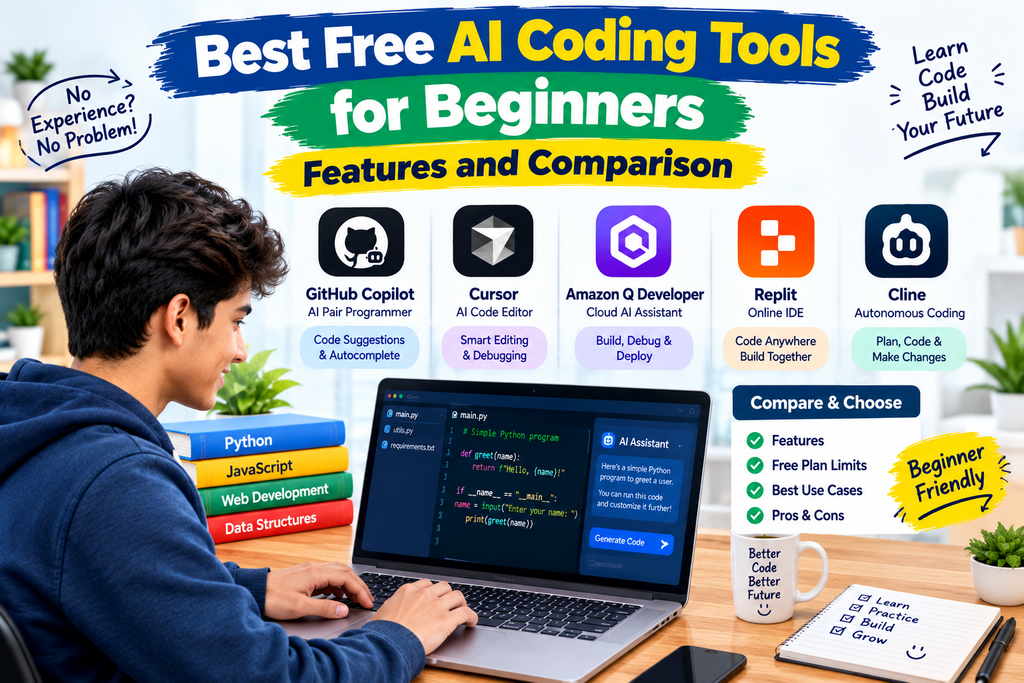
Comparison of Free AI Coding Tools
The following table summarizes the main differences. Free-plan allowances and features can change, so use the linked official websites to confirm the latest details.
| Tool |
|---|
| GitHub Copilot |
|---|
| Cursor |
|---|
| Amazon Q Developer |
|---|
| Replit |
|---|
| Cline |
|---|
| Best use |
|---|
| Coding inside an editor |
|---|
| AI-assisted editing |
|---|
| AWS and programming |
|---|
| Learning and practising online |
|---|
| Flexible AI coding workflows |
|---|
| Main benefit |
|---|
| Code suggestions and explanations |
|---|
| Help with project files and code changes |
|---|
| Development and cloud assistance |
|---|
| Browser-based coding |
|---|
| Open-source and configurable |
|---|
| Important limitation |
|---|
| Limited free usage |
|---|
| Limited free AI usage |
|---|
| Some features are specialized |
|---|
| AI and deployment limits may apply |
|---|
| Model usage may cost money |
|---|
How to Choose the Right AI Coding Tool
The best tool depends on your experience, goals, and preferred way of working. You do not need to install every tool listed in this guide.
If You Are Completely New to Coding
Start with an accessible environment where you can write and run small programs. Replit can be a convenient option because it works in a browser.
Begin with basic programming concepts such as variables, conditions, loops, and functions. Ask an AI assistant to explain each concept with a simple example.
If You Use Visual Studio Code
GitHub Copilot is worth exploring if you prefer writing code in Visual Studio Code. Its free plan offers limited AI assistance, which can be sufficient for learning and small exercises.
Ask for explanations rather than only asking for finished code. This helps you understand what you are writing.
If You Want AI to Help With Existing Projects
Cursor is worth considering if you want an editor with AI features designed around working with code and project files.
Start by asking it to explain your project’s structure. Before accepting suggested changes, review the affected files and test the result.
If You Want to Learn Cloud Development
Amazon Q Developer may be suitable if your learning goals include AWS services and cloud-based applications.
You can begin with basic programming before moving on to cloud concepts. Check whether the specific AWS features you need are included in the free tier.
If You Want More Control
Cline may be useful if you are comfortable installing extensions and configuring an AI model provider. Before using it extensively, understand the model’s pricing and the permissions it needs.
How to Use AI Coding Tools Effectively
An AI coding assistant is most useful when you provide clear instructions and verify its output.
1. Describe one task at a time.
Instead of asking, “Build a complete application,” begin with a smaller request, such as “Create a Python function that checks whether a number is even.”
2. Mention your programming language.
Tell the assistant whether you want Python, JavaScript, HTML, CSS, or another language. Include any relevant framework or version if you know it.
3. Ask for an explanation.
After receiving code, ask the assistant to explain what each important section does. This turns coding assistance into a learning opportunity.
4. Test the result.
Run the code and try different inputs. Check what happens when the input is empty, invalid, unusually large, or unexpected.
5. Fix errors step by step.
If something fails, share the error message and the relevant code. Remove passwords, API keys, personal information, and other secrets before sharing.
6. Keep backups.
Before allowing an AI tool to make major changes, save your work or use version control. This makes it easier to recover if a change breaks your project.
7. Learn the fundamentals.
AI can help you solve a problem, but understanding variables, functions, data structures, and debugging will make you a stronger programmer.
Can Beginners Build Websites With AI Coding Tools?
Yes. Beginners can use AI coding assistants to learn how websites are created and to develop simple projects.
For example, you could start with a personal portfolio page using HTML and CSS. After that, you might add JavaScript to create an interactive button or a simple calculator.
A practical learning process is:
- Ask the AI to explain the basic structure of an HTML page.
- Create the page and add a simple heading, paragraph, and image.
- Use CSS to change the layout, spacing, and typography.
- Add a small JavaScript interaction.
- Test the website on different screen sizes.
- Review the code and fix accessibility or functionality issues.
Do not assume that a website is secure or ready for public use simply because AI generated it. Authentication, payments, databases, and user information require additional care and testing.
Benefits of Free AI Coding Tools
AI coding assistants can provide several benefits when used responsibly.
- Faster learning: Get explanations and examples while practising.
- Help with errors: Understand common mistakes and possible solutions.
- Less repetitive work: Generate boilerplate code and routine functions.
- Project ideas: Turn a small idea into a step-by-step development plan.
- Improved productivity: Spend more time understanding and improving a project.
However, AI-generated code can be inaccurate, inefficient, insecure, or incompatible with your project. Treat suggestions as a starting point, not as proof that the code is correct.
Limitations and Safety Tips
Before using any AI coding tool, keep these points in mind:
- Free plans often have usage limits.
- Some tools require an account or software installation.
- AI-generated code may contain bugs or security vulnerabilities.
- Sending code to an external service may expose confidential information.
- Open-source tools may still require paid model access.
- Pricing, features, and model availability can change.
Never paste passwords, private API keys, payment information, or confidential business code into an AI assistant unless you have verified that the workflow is appropriate and secure.
For important applications, use proper testing, code review, and security checks before deployment.
Frequently Asked Questions
1. What is the best free AI coding tool for beginners?
There is no single best option for everyone. GitHub Copilot is useful for editor-based assistance, Replit is convenient for browser-based practice, and Cursor offers an AI-focused coding environment. Choose according to your needs and the current free-plan limits.
2. Can I learn coding using AI for free?
Yes. You can begin learning programming with free coding environments, documentation, tutorials, and AI tools that provide free access. Some features or usage levels may require payment.
3. Can AI coding tools write an entire program?
AI tools can generate substantial amounts of code, but large projects usually need planning, review, debugging, and testing. Generated code may not meet every requirement or handle every edge case.
4. Are AI coding tools suitable for students?
Yes. Students can use them to understand programming concepts, practise exercises, and review errors. They should follow their institution’s academic rules and make sure they understand the work they submit.
5. Do I need programming knowledge to use AI coding tools?
You can start with basic instructions and simple examples without extensive programming knowledge. However, learning programming fundamentals helps you identify errors, evaluate suggestions, and build more reliable applications.
6. Are open-source AI coding tools always free?
No. The software may be free, but the AI model, API usage, hosting, or other services may cost money. Check the complete setup before relying on a tool for a long project.
Conclusion
Free AI coding tools can make programming more approachable for beginners. GitHub Copilot, Cursor, Amazon Q Developer, Replit, and Cline each offer different ways to receive coding assistance, learn concepts, and work on projects.
If you are just starting, choose one tool and practise with a small project. Focus on understanding the code, testing the output, and learning how to fix errors instead of depending entirely on AI-generated answers.
Remember that the best coding assistant is not necessarily the one that generates the most code. It is the one that helps you learn, work safely, and build a better understanding of programming.