Best Free AI Tools for Students and Learners
Artificial intelligence is changing the way students learn, research, write, and organize their studies. Today, students can use AI tools to understand difficult topics, prepare revision notes, improve grammar, explore research sources, and manage assignments more efficiently.
The good news is that many popular AI tools offer free plans. Students do not necessarily need to pay for expensive subscriptions to begin using AI for learning.
However, every tool has different strengths and limitations. Some are better for explaining concepts, while others are more useful for research, writing, or organizing study materials.
In this guide, we will explore the best free AI tools for students and learners, compare their features, discuss their limitations, and explain how to use them responsibly.
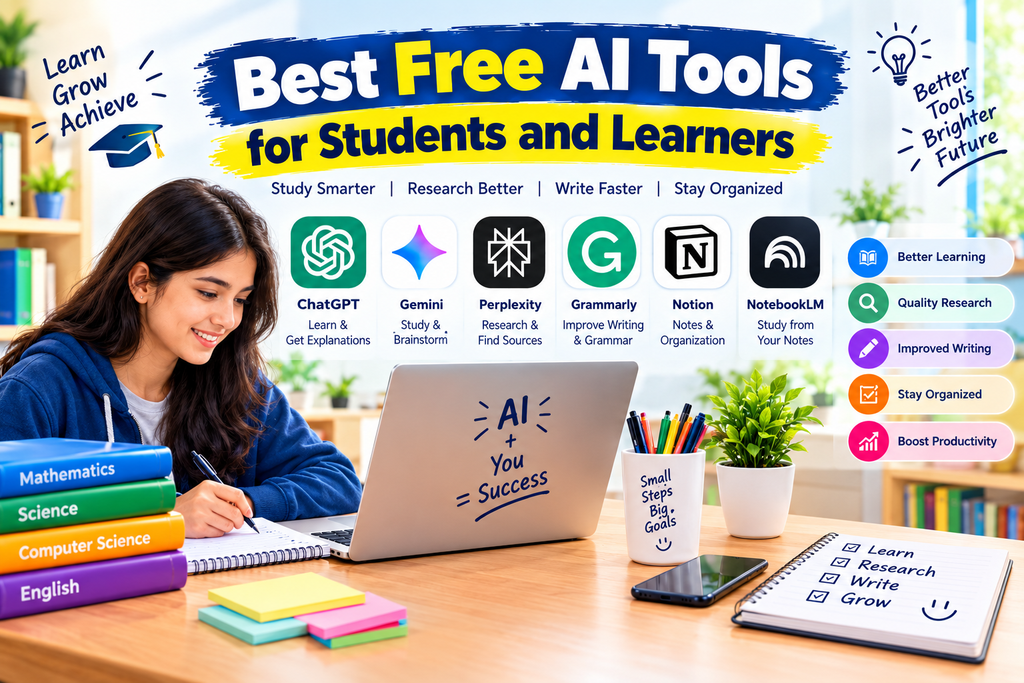
Quick Comparison of the Best Free AI Tools for Students
| AI Tool |
|---|
| Best For |
|---|
| Free Access |
|---|
| ChatGPT |
|---|
| Learning, explanations, and practice questions |
|---|
| Yes, with usage limits |
|---|
| Google Gemini |
|---|
| Study assistance and brainstorming |
|---|
| Yes, with feature limits |
|---|
| Perplexity AI |
|---|
| Research and finding sources |
|---|
| Yes, with limits |
|---|
| Grammarly |
|---|
| Grammar and writing improvement |
|---|
| Yes, with premium features paid |
|---|
| Notion |
|---|
| Notes, planning, and organization |
|---|
| Free plan available; AI access may be limited |
|---|
| Google NotebookLM |
|---|
| Studying from notes and documents |
|---|
| Free access with usage limits |
|---|
Free-plan features and usage limits may change. Check each tool’s official website before relying on a particular feature.
1. ChatGPT: Best for Learning and Understanding Difficult Topics
ChatGPT is a general-purpose AI assistant that can help students understand concepts, practise questions, generate ideas, and improve their study routines.
Instead of simply searching for an answer, students can ask follow-up questions until they understand a topic.
Key Features
- Explains difficult concepts in simple language.
- Creates practice questions and quizzes.
- Helps organize revision schedules.
- Summarizes provided notes and text.
- Provides feedback on writing.
- Helps explain programming concepts and solve learning problems.
How Students Can Use ChatGPT
Suppose you are studying biology and find photosynthesis difficult to understand. You can ask ChatGPT to explain it in simple language, provide an example, and then test your knowledge with five questions.
You can also use it to prepare for examinations, practise English, learn mathematics step by step, or create a weekly study timetable.
Example prompt:
“Explain photosynthesis in simple language for a beginner. Give me an everyday example, summarize the important points, and create five practice questions. Let me answer each question before showing me the correct answer.”
This approach encourages active learning instead of memorizing answers without understanding them.
Advantages
- Useful for many subjects.
- Allows interactive learning through follow-up questions.
- Can adapt explanations to different learning levels.
- Helpful for brainstorming and revision.
Limitations
ChatGPT can occasionally provide incorrect information, calculations, or references. Its free plan also has usage limits that can vary over time. Students should verify important facts using textbooks, class notes, and reliable sources.
Official website: https://chatgpt.com/
2. Google Gemini: Best for Study Assistance and Brainstorming
Google Gemini is an AI assistant that can help students explore topics, understand concepts, generate ideas, and work with supported Google services.
It can be particularly useful when students need an explanation, a structured outline, or ideas for a presentation or project.
Key Features
- Explains academic topics.
- Helps brainstorm project ideas.
- Creates revision questions and summaries.
- Assists with writing and planning.
- Supports certain file and image-based tasks, depending on availability.
- Offers study-related features to eligible users.
How Students Can Use Gemini
Imagine that you are preparing a presentation about climate change. You can ask Gemini to suggest an outline, explain the main causes and effects, and propose questions that your classmates might ask.
You can then verify the information using scientific publications and trusted educational sources.
Students should also explore Google’s study-focused features where available. Google offers a student promotion in India for eligible university students aged 18 and above, with specific conditions and an offer deadline. Check the official eligibility requirements before signing up.
Advantages
- Useful for brainstorming and learning.
- Can help structure presentations and projects.
- Works well for generating study plans and practice questions.
Limitations
Not every feature is available to every user. Usage limits, regional availability, account eligibility, and subscription requirements can differ. AI-generated answers should always be checked for accuracy.
Official website: https://gemini.google.com/
3. Perplexity AI: Best for Research and Finding Sources
Perplexity AI is designed to help users research questions and explore information from the web. It can provide answers with links to sources, making it useful when students want to investigate a subject further.
For academic work, the ability to inspect sources is important because students need to distinguish reliable evidence from unsupported claims.
Key Features
- Helps explore research questions.
- Provides links to supporting web sources.
- Summarizes information from multiple pages.
- Helps discover articles and useful websites.
- Supports follow-up questions during research.
How Students Can Use Perplexity
Suppose you are writing a report about renewable energy. You can ask Perplexity to identify major types of renewable energy, explain their benefits, and suggest reliable sources for further reading.
Open the cited sources and read the relevant sections before using the information in your report. A citation does not automatically mean that every statement is accurate or that the source is suitable for academic work.
Example prompt:
“Explain the advantages and limitations of solar energy. Include reliable sources, prioritize scientific or government publications, and identify which claims I should verify before using them in an academic report.”
Advantages
- Useful for finding starting points for research.
- Makes source discovery easier.
- Can save time when exploring unfamiliar topics.
Limitations
Some advanced research capabilities may be restricted by the free plan. Sources can also be incomplete, outdated, or misinterpreted. Always check the original publication and follow your institution’s citation requirements.
Official website: https://www.perplexity.ai/
4. Grammarly: Best for Grammar and Writing Improvement
Grammarly helps students improve written English by identifying grammar, spelling, punctuation, and clarity issues. It can be useful for essays, reports, emails, applications, and other academic writing.
It is especially helpful for learners who want to communicate more clearly in English.
Key Features
- Checks spelling and grammar.
- Identifies punctuation problems.
- Suggests clearer wording.
- Helps improve sentence readability.
- Offers additional AI writing features, depending on the plan.
How Students Can Use Grammarly
After writing an essay, students can use Grammarly to identify mistakes and review suggestions.
For example, if you write a long sentence that is difficult to understand, Grammarly may suggest a clearer version. Review the suggestion and learn why the revised sentence works better.
Example prompt for writing feedback:
“Review this paragraph for grammar, punctuation, and clarity. Explain each important correction so I can improve my writing skills.”
Advantages
- Easy to use for proofreading.
- Helps identify common English mistakes.
- Useful for academic and professional communication.
Limitations
Some advanced features require a paid plan. Grammarly is not a substitute for understanding your subject, checking facts, or following your institution’s academic-integrity rules.
Official website: https://www.grammarly.com/
5. Notion: Best for Notes and Study Planning
Notion is a workspace for organizing notes, tasks, projects, and information. Students can use it to create subject-wise notes, track assignment deadlines, and build a study planner.
It is particularly useful for learners who want to keep their study materials organized in one place.
Key Features
- Creates digital notes and pages.
- Organizes subjects and study resources.
- Tracks assignments and deadlines.
- Supports task lists and project planning.
- Provides templates for different workflows.
- Offers AI capabilities according to the current plan and access.
How Students Can Use Notion
A college student can create separate pages for each subject, add important topics, and maintain a list of upcoming examinations and assignments.
For example, you can create a weekly study planner with three sections: topics to learn, questions to practise, and topics to revise.
Notion’s regular workspace features and its AI features do not necessarily have the same access conditions. Check the official plan details before assuming that all AI functions are free.
Advantages
- Helps organize study materials.
- Useful for tracking deadlines.
- Can support long-term learning routines.
Limitations
It may take some time to learn how to organize a workspace effectively. Some AI features may require a paid subscription or depend on the account’s current access.
Official website: https://www.notion.so/
6. Google NotebookLM: Best for Studying from Your Own Notes
Google NotebookLM is a study and research assistant that works with sources you provide, such as supported documents and notes. It can help students explore their own study material rather than relying only on general web answers.
This makes it useful for revision when you already have lecture notes, course readings, or reference documents.
Key Features
- Works with supported uploaded or linked sources.
- Helps summarize study materials.
- Answers questions based on available sources.
- Can help create study guides and revision questions.
- Offers additional study formats, subject to current feature and usage limits.
How Students Can Use NotebookLM
Suppose you have a PDF containing lecture notes for a history examination. Add the document to a notebook, then ask for a summary of a specific chapter, a list of key dates, or ten practice questions based on the material.
Compare its answers with your original notes, especially when studying facts, dates, names, and definitions.
Advantages
- Useful for revising provided documents.
- Helps locate important information in long material.
- Can turn notes into more structured revision resources.
Limitations
Its answers depend on the sources and features available to the user. It may misunderstand a passage or overlook important details. Free usage limits can also change.
Official website: https://notebooklm.google.com/
Best Free AI Tools for Different Student Needs
Choosing the right tool depends on what you want to accomplish.
| Student Need |
|---|
| Recommended Tool |
|---|
| Understanding difficult concepts |
|---|
| ChatGPT or Gemini |
|---|
| Exploring research topics |
|---|
| Perplexity AI |
|---|
| Improving English grammar |
|---|
| Grammarly |
|---|
| Organizing notes and deadlines |
|---|
| Notion |
|---|
| Revising from PDFs and lecture notes |
|---|
| NotebookLM |
|---|
| Preparing practice questions |
|---|
| ChatGPT, Gemini, or NotebookLM |
|---|
| Planning a presentation |
|---|
| ChatGPT or Gemini |
|---|
You do not need to use every tool. Start with one general-purpose assistant and add another tool only when it solves a specific problem.
How to Use AI Tools for Studying Effectively
AI tools are most useful when they support your learning process instead of doing all your work for you.
Step 1: Identify What You Need to Learn
Choose one topic from your syllabus. Write down what you already understand and what you find difficult.
Step 2: Ask for a Simple Explanation
Use ChatGPT or Gemini to explain the topic at your current learning level. Ask for examples and definitions when necessary.
Step 3: Check the Information
Compare important facts with textbooks, class notes, official educational resources, and reliable publications. Use Perplexity to discover sources when appropriate.
Step 4: Create Revision Material
Use your notes or NotebookLM to prepare summaries, flashcards, and practice questions. Make sure the material covers the topics required by your syllabus.
Step 5: Test Yourself
Try answering questions without looking at the AI-generated explanation. Ask the tool to review your reasoning afterward.
Step 6: Improve Your Writing
Write your own answer or assignment first. Use Grammarly for proofreading and clarity suggestions, then decide which changes improve your work.
Step 7: Organize Your Schedule
Use Notion or a simple calendar to record your revision sessions, assignment deadlines, and examination dates.
This workflow helps students use AI to understand, practise, and improve rather than simply copy answers.
Useful AI Prompts for Students
Here are five prompts you can adapt to your subject.
1. Explain a difficult topic
“Explain [topic] in simple language for a beginner. Give two examples, summarize the key points, and list common mistakes.”
2. Prepare for an examination
“Create a revision plan for [subject] over the next seven days. Include daily topics, short revision sessions, and practice questions.”
3. Generate a practice quiz
“Create ten questions about [topic], starting with easy questions and progressing to more difficult ones. Ask one question at a time and explain my mistakes.”
4. Summarize study notes
“Summarize the following notes into clear headings, important definitions, key facts, and revision questions. Do not add unsupported information.”
5. Improve an essay
“Review my essay for grammar, clarity, and structure. Explain the most important corrections and preserve my original meaning and personal voice.”
Replace the bracketed text with your subject or topic. Always review the results before using them.
Are Free AI Tools Safe for Students?
AI tools can be useful, but students should understand their limitations and protect their information.
Follow these practical guidelines:
- Verify important facts: AI tools can make mistakes, including convincing but incorrect claims.
- Protect personal information: Avoid uploading passwords, identification documents, private student records, or confidential information.
- Respect academic rules: Check whether your school or college permits AI assistance for a particular assignment.
- Write in your own words: Understand the topic and develop your own answer instead of submitting unreviewed AI output.
- Check sources: Open references and confirm that they support the claims you intend to use.
- Review privacy settings: Read the service’s privacy information before uploading sensitive or unpublished work.
- Watch free-plan limits: Some features may require payment, and access conditions can change.
AI should be used as a learning assistant, not as a replacement for independent thinking.
Frequently Asked Questions
1. What is the best free AI tool for students?
ChatGPT is a useful starting point for general learning, explanations, brainstorming, and practice questions. However, the best tool depends on your needs. Perplexity is useful for discovering research sources, Grammarly helps with writing, and NotebookLM can help students revise from their own documents.
2. Can students use AI tools for free?
Yes. Several tools offer free plans, although the available features and usage limits differ. Check the official websites for current conditions before choosing a tool.
3. Which AI tool is best for exam preparation?
ChatGPT and Gemini can help explain concepts and generate practice questions. NotebookLM can be useful for revising from supported course documents. Students should compare AI-generated material with their official syllabus and class notes.
4. Can AI tools write assignments for students?
AI tools can help with brainstorming, outlining, explanations, and proofreading. However, students should follow their institution’s rules and avoid submitting AI-generated work as their own when that is not permitted.
5. Is Perplexity AI good for academic research?
Perplexity can help discover information and potential sources. Students should open the original publications, evaluate their credibility, and verify that each source supports the claim being made.
6. Is Notion AI completely free?
Do not assume that every Notion AI feature is included in the free workspace plan. Availability and limits depend on the current plan and account conditions. Check Notion’s official pricing page.
7. Do AI tools always provide accurate answers?
No. AI tools can produce incorrect facts, misleading summaries, or incomplete explanations. Verify important information using trusted sources.
8. Can beginners use AI tools without technical knowledge?
Yes. Most of the tools discussed in this article are designed to be accessible through a web interface or app. Beginners can start by asking simple questions and gradually learn more advanced features.
Conclusion
The best free AI tools for students can make learning more organized, interactive, and efficient. ChatGPT and Gemini are useful for explanations and brainstorming, Perplexity helps explore research sources, Grammarly supports better writing, Notion organizes study tasks, and NotebookLM can help students work with their own study materials.
You do not need to subscribe to every tool. Choose one or two that match your learning goals, understand their limitations, and verify important information before relying on it.
Most importantly, use AI to strengthen your knowledge, practise problem-solving, and improve your skills. When combined with textbooks, independent thinking, and consistent revision, these tools can become valuable study companions.