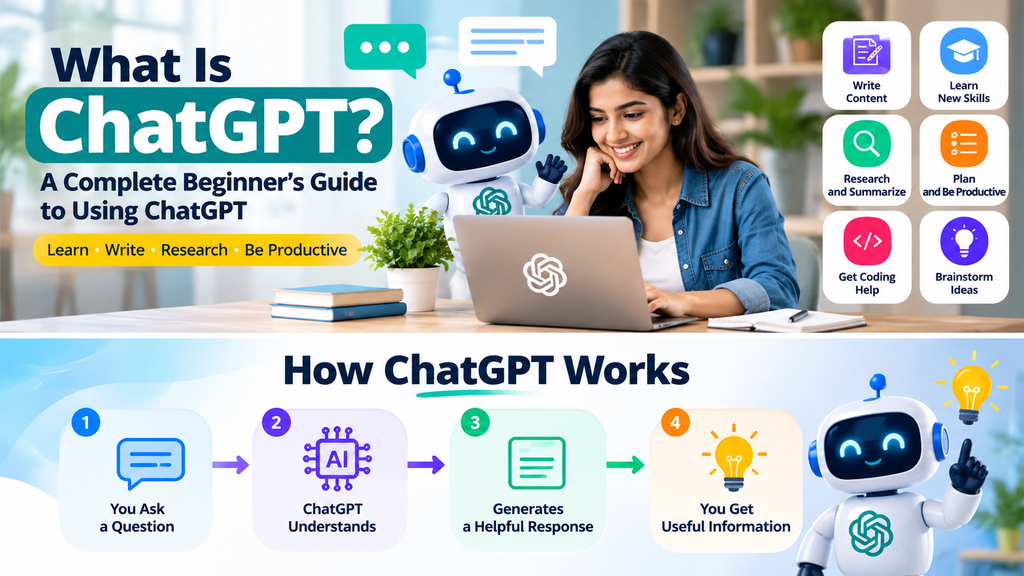
What Is ChatGPT? A Beginner’s Guide to Using ChatGPT
Introduction
Artificial intelligence is changing the way people learn, work, and communicate. One of the most widely known AI tools is ChatGPT. Students use it to understand difficult topics, professionals use it to organize their work, and content creators use it to brainstorm ideas and improve their writing.
If you are new to artificial intelligence, you may have questions. What is ChatGPT? How does it work? Can beginners use it without technical knowledge? And how can you get useful answers instead of confusing or inaccurate responses?
This beginner-friendly guide explains ChatGPT in simple language. You will learn how to get started, write better prompts, explore practical uses, understand its limitations, and use it more responsibly.
What Is ChatGPT?
ChatGPT is an AI-powered conversational assistant developed by OpenAI. It can understand and generate natural-language responses to questions and instructions.
Instead of searching through multiple webpages for every question, you can describe what you need in a conversation. ChatGPT can help explain a concept, draft an email, summarize text, brainstorm ideas, assist with coding, and perform many other language-based tasks.
For example, you can ask:
- Explain artificial intelligence in simple words.
- Help me write a professional email.
- Create a beginner-friendly study plan.
- Summarize this paragraph into five bullet points.
- Suggest ideas for a small online business.
ChatGPT responds based on the information and instructions available to it. You can then ask follow-up questions to clarify or improve the response.
ChatGPT is an assistant, not a replacement for your own judgment. Its answers should be reviewed, especially when accuracy is important.
How Does ChatGPT Work?
ChatGPT is based on large language model technology. A language model is trained to recognize patterns in language and generate text that fits the context of a conversation.
Here is a simplified explanation of how an interaction works:
1- You provide an input: You type a question, instruction, or other content into ChatGPT.
2- The model processes the context: It uses the words and conversation context to interpret what you are asking.
3- It generates a response: The model produces a response one part at a time based on patterns learned during training and the instructions it receives.
4- You continue the conversation: You can ask for clarification, request a different format, or provide additional details.
Some ChatGPT experiences also support capabilities such as working with uploaded files, images, voice, or web information. The tools available depend on the product, plan, settings, and current release.
It is important to understand that ChatGPT does not think or understand the world exactly like a human. It generates responses using learned patterns and available context. A response can sound confident while still containing mistakes.

How to Get Started With ChatGPT
Getting started with ChatGPT is straightforward. You do not need to know programming or have an advanced technical background to begin.
Step 1: Open ChatGPT
Visit the official ChatGPT website or use the official mobile app. Make sure you are using the genuine service rather than an unrelated website with a similar name.
Step 2: Sign In or Create an Account
Follow the sign-in or account creation instructions shown on the official service. Available access options and account requirements may change over time.
Step 3: Start a New Conversation
Once you reach the chat interface, look for the message box. This is where you type your question or instruction.
Step 4: Ask a Clear Question
Start with something simple, such as:
“Explain machine learning to a complete beginner using a simple example.”
A specific question gives ChatGPT useful context about the type of answer you want.
Step 5: Improve the Response
If the first answer is too long, too technical, or not detailed enough, ask for a change.
For example:
- Explain that in simpler language.
- Give me three practical examples.
- Turn this into a checklist.
- Make the answer shorter.
- Explain the second point in more detail.
You do not need to write a perfect prompt on your first attempt. You can refine your instructions as the conversation develops.
What Is a Prompt in ChatGPT?
A prompt is the question, instruction, or information you give an AI tool to guide its response.
A prompt can be a short question or a detailed set of instructions. The quality of your prompt can influence how relevant and useful the answer is.
Basic prompt:
“Write about digital marketing.”
This is broad. ChatGPT may not know whether you need a short explanation, a detailed article, a presentation, or a business strategy.
Improved prompt:
“Explain digital marketing to a beginner in simple English. Cover its main channels and give one practical example for a small business.”
The improved prompt tells ChatGPT:
- The subject
- The intended audience
- The language and writing style
- The main points to include
- The type of example needed
You can also specify a format, such as a table, numbered list, email, outline, or step-by-step tutorial.
Practical Ways to Use ChatGPT
ChatGPT can support many everyday activities. The following examples show how beginners can use it in practical situations.
1. Writing and Content Creation
ChatGPT can help you brainstorm, organize, draft, and revise written content.
You can use it to:
- Generate blog post ideas
- Create article outlines
- Draft emails and announcements
- Rewrite confusing sentences
- Suggest headlines
- Prepare social media captions
- Check grammar and improve readability
Example prompt:
“Create an outline for a beginner-friendly article about time management. Include an introduction, six main sections, practical examples, and a conclusion.”
For professional or public content, review the result carefully. Add your own expertise, examples, and original insights rather than publishing an unedited AI draft.
2. Learning and Education
ChatGPT can act as a study assistant by explaining concepts, creating practice questions, and helping you organize your learning.
For example, you can ask it to:
- Explain a difficult topic in simple language
- Create a weekly study schedule
- Generate quiz questions
- Compare related concepts
- Give examples of a formula or rule
- Help you practice a new language
Example prompt:
“Teach me the basics of Excel as if I have never used it. Divide the lesson into small steps and give me a short practice task after each step.”
Use textbooks, course materials, and reliable references to verify important academic information.
3. Research and Summarization
ChatGPT can help you organize information and understand long or complicated text.
Possible tasks include:
- Summarizing content you provide
- Creating a list of research questions
- Comparing concepts
- Organizing notes
- Explaining technical terminology
- Preparing a checklist for further research
Example prompt:
“Summarize the following text into five key points. Keep the original meaning and identify any claims that need independent verification.”
A summary is not proof that every statement in the original material is correct. When you need current facts, sources, or citations, check the underlying evidence.
4. Productivity and Planning
ChatGPT can help you break a large task into manageable steps.
You can ask it to:
- Create a daily schedule
- Organize a project
- Prepare meeting agendas
- Draft task checklists
- Suggest ways to manage time
- Turn rough notes into an action plan
Example prompt:
“Help me plan a simple weekly content schedule for a new AI blog. I can write for one hour each day. Include time for research, drafting, editing, and publishing.”
Treat the result as a starting point. Adjust the plan to match your actual schedule and priorities.
5. Coding and Technical Support
ChatGPT can assist beginners with programming concepts and common technical tasks.
It may help you:
- Explain code
- Draft simple code examples
- Identify possible errors
- Understand technical documentation
- Create practice exercises
- Compare programming approaches
Example prompt:
“Explain what an HTML link is. Show me a simple example and explain each part of the code.”
AI-generated code can contain bugs or security problems. Test code in a safe environment and understand what it does before using it in a live application.
6. Business and Marketing
Small businesses and independent creators can use ChatGPT to organize ideas and prepare draft materials.
Examples include:
- Brainstorming product names
- Drafting customer support replies
- Preparing product descriptions
- Creating marketing content ideas
- Organizing customer feedback
- Outlining a simple business plan
Example prompt:
“Suggest ten content ideas for a small online store that sells handmade notebooks. Focus on helpful topics for people who enjoy journaling.”
Do not enter confidential customer information, private business records, or sensitive financial details unless you have checked that the tool and your organization’s policies allow it.
How to Write Better ChatGPT Prompts
Clear instructions make it easier to get a response that fits your needs. You can use this simple approach:
1. State Your Goal
Explain what you want ChatGPT to do.
For example: “Help me prepare a beginner’s guide to email marketing.”
2. Describe Your Audience
Tell it who the content is for.
For example: “Write for small business owners who have never used email marketing.”
3. Add Important Details
Mention the information that should be included or avoided.
For example: “Cover email lists, subject lines, useful content, and common mistakes. Avoid advanced technical terminology.”
4. Choose a Format
Tell ChatGPT how you want the response organized.
For example: “Use clear headings, short paragraphs, and a numbered checklist.”
5. Review and Refine
Read the response and ask for specific improvements.
For example: “Add a practical example for a local bakery and shorten the introduction.”
A useful prompt formula is:
Goal + Audience + Details + Format + Constraints
You do not need to include every part in every prompt. Use the details that matter for the task.
ChatGPT Free vs. Paid Plans
ChatGPT may offer different access plans with different features and usage limits. The exact plans, prices, model access, and limits can change, so check the official ChatGPT plan information before making a purchase.
Free Access
Free access can be a practical starting point for people who want to explore ChatGPT.
Depending on current availability and limits, it may be suitable for:
- Asking everyday questions
- Learning new concepts
- Drafting short content
- Brainstorming ideas
- Trying supported tools and features
Paid Plans
Paid plans may provide higher usage limits, access to additional models or tools, or other features, depending on the plan.
They may be worth evaluating if you regularly use ChatGPT for work, research, content production, or tasks that require capabilities not available within your current access.
Before subscribing, consider how often you use the service, which features you actually need, and whether the cost fits your budget. You do not need a paid plan simply to begin learning.
Limitations of ChatGPT
ChatGPT can be useful, but it is not perfect. Understanding its limitations helps you use it more effectively.
It Can Make Mistakes
ChatGPT may provide incorrect facts, calculations, explanations, or references. Verify important information using trustworthy sources.
It May Lack Current Information
Some responses may not reflect the latest events, product changes, prices, or regulations. Use suitable current sources when freshness matters.
It Can Misunderstand Your Instructions
A vague prompt or missing context can lead to an answer that does not match your needs. Add details and clarify what you mean.
It Does Not Replace Professional Advice
For medical, legal, financial, safety, or other high-stakes decisions, consult an appropriately qualified professional and authoritative sources.
It May Produce Generic Content
A response can be grammatically polished but still lack original insight or a strong understanding of your specific audience. Add your own experience and review the result before using it.
Privacy and Safe Use of ChatGPT
Responsible use includes thinking carefully about the information you share.
Follow these basic precautions:
- Avoid sharing passwords, verification codes, payment details, or private account credentials.
- Do not upload confidential documents unless you understand the service’s data controls and have permission to share them.
- Review the privacy and data settings available in your account.
- Be careful with personal information about other people.
- Check your workplace or school rules before using AI with their information.
- Verify important answers before acting on them.
Different products and account settings can handle data differently. Read the current privacy information for the service you use rather than assuming every conversation is treated the same way.
Common Mistakes Beginners Make
Mistake 1: Asking Very Broad Questions
A question such as “Tell me about business” may produce a large, unfocused answer.
How to improve: Narrow the topic and describe what you need to learn or accomplish.
Mistake 2: Expecting Perfect Answers Immediately
Even a detailed prompt may need refinement.
How to improve: Treat the first response as a draft. Ask focused follow-up questions and check the result.
Mistake 3: Trusting Every Answer
Confident wording does not guarantee accuracy.
How to improve: Verify claims, figures, quotes, and references using reliable sources.
Mistake 4: Copying AI Content Without Reviewing It
Unedited output may contain errors, repetition, unsupported claims, or language that does not fit your audience.
How to improve: Edit the content, add original value, and make sure it meets your quality standards.
Mistake 5: Sharing Sensitive Information
Entering private information without considering the risks can create privacy problems.
How to improve: Share only what is necessary and follow the service’s privacy controls and your own organization’s policies.
A Simple 7-Day ChatGPT Learning Plan
If you are completely new to ChatGPT, a short practice plan can help you build confidence.
Day 1: Explore the Interface
Open ChatGPT and ask five everyday questions. Practice starting a conversation and asking a follow-up question.
Day 2: Practice Better Prompts
Take three simple prompts and improve them by adding an audience, goal, and desired format.
Day 3: Learn With ChatGPT
Choose a topic you want to understand. Ask for a simple explanation, examples, and a short quiz. Verify important facts.
Day 4: Practice Writing
Ask ChatGPT to help draft an email, outline, or short article. Review and edit the result yourself.
Day 5: Organize a Real Task
Use ChatGPT to prepare a checklist or schedule for a task you actually need to complete.
Day 6: Explore a Specialized Use
Try a task relevant to your interests, such as coding help, research organization, or brainstorming business ideas.
Day 7: Review and Reflect
Look back at your prompts and responses. Identify which instructions produced useful results and which ones need improvement.
The goal is not to use ChatGPT for everything. It is to learn where it helps and where human judgment remains essential.
Frequently Asked Questions
What is ChatGPT in simple words?
ChatGPT is an AI-powered conversational assistant that responds to questions and instructions in natural language. People use it for tasks such as learning, writing, brainstorming, summarizing, and coding assistance.
Is ChatGPT free to use?
ChatGPT may be available through free access as well as paid plans. Features and usage limits can vary and change over time. Check the official plan information for current details.
Can beginners use ChatGPT?
Yes. Beginners can start by asking simple questions in everyday language. No programming knowledge is required for ordinary conversations.
Do I need coding skills to use ChatGPT?
No. You can use ChatGPT for writing, learning, planning, and many other tasks without coding. Programming knowledge is only needed for certain technical activities.
Can ChatGPT write articles and blog posts?
ChatGPT can help brainstorm topics, prepare outlines, draft sections, and revise writing. The final article should be checked, edited, and improved with original information and useful insights.
Is ChatGPT always accurate?
No. ChatGPT can make mistakes, misunderstand a question, or provide outdated or unsupported information. Verify important answers with reliable sources.
Can I use ChatGPT in Hindi?
Yes. You can use ChatGPT in Hindi by typing your questions or instructions in Hindi. ChatGPT can understand and respond in Hindi, helping you with writing, learning, translation, research, and everyday tasks. You can also ask it to explain difficult topics in simple Hindi or translate content between Hindi and English. For the best results, write your question clearly and review the response for accuracy.
Can ChatGPT replace Google Search?
ChatGPT and search engines serve different purposes. ChatGPT is useful for conversational explanations and drafting. Search engines help you discover webpages and sources. For current information and independent verification, consult relevant sources directly.
Is it safe to share personal information with ChatGPT?
Be cautious. Avoid sharing passwords, payment credentials, sensitive personal details, or confidential information unless you have reviewed the service’s privacy controls and have a valid reason to share it.
What should I learn after ChatGPT?
Once you are comfortable with basic prompts, explore topics such as AI research tools, image generation, automation, productivity workflows, and responsible AI use. Choose tools based on the tasks you want to accomplish.
Conclusion
ChatGPT is an accessible way for beginners to explore artificial intelligence and use it in everyday tasks. It can help with writing, learning, research, planning, coding assistance, and brainstorming.
The most useful skill is learning how to explain your goal clearly, provide relevant context, and review the response critically. Start with simple tasks, experiment with better prompts, and verify information whenever accuracy matters.
You do not need to master every feature at once. With regular practice and responsible use, ChatGPT can become a helpful assistant for learning and getting work done.
Explore more practical AI tutorials and beginner-friendly guides on AIToolsNv.