What Are AI Tools? A Beginner’s Guide
Introduction
AI tools for beginners can make everyday tasks easier, from writing and research to productivity and automation.
Artificial intelligence has quickly become part of everyday digital life. You may have already used an AI chatbot, seen an AI-generated image, or heard about AI tools that can write, research, code, automate tasks, and analyze information.
But if you are new to AI, one question naturally comes up:
What are AI tools, and how can you actually use them?
The good news is that you do not need to be a programmer or an AI expert to get started.
Today, AI tools are available for writing, research, image creation, video production, coding, productivity, business, automation, and many other tasks.
This guide explains AI tools in simple language and shows how beginners can start using them practically.
What Are AI Tools?
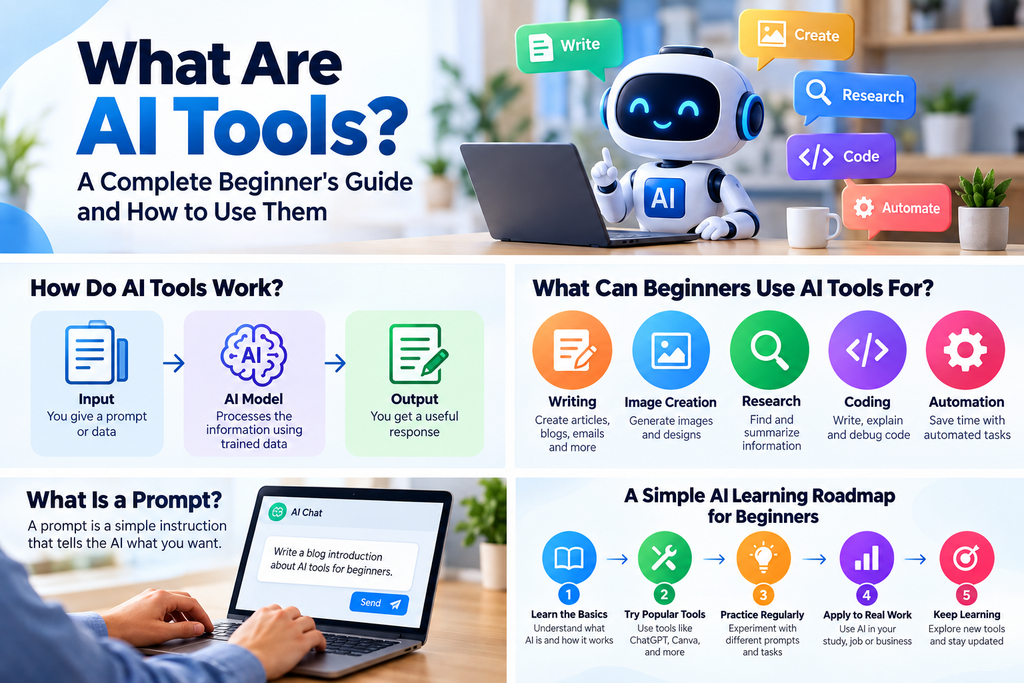
AI tools are software applications, websites, or digital services that use artificial intelligence to help users perform tasks such as generating content, analyzing information, answering questions, creating images, writing code, or automating workflows.
For example, an AI writing tool can help you create an article outline, while an AI image tool can generate an image from a text description.
AI tools can be used for many different purposes, including:
- Writing and content creation
- Research and summarization
- Image generation and editing
- Video creation
- Coding and software development
- Productivity
- Business and marketing
- Data analysis
- Automation
- Customer support
- AI agents
However, not every AI tool is designed for every task.
The right AI tool depends on what you are trying to accomplish.
How Do AI Tools Work?
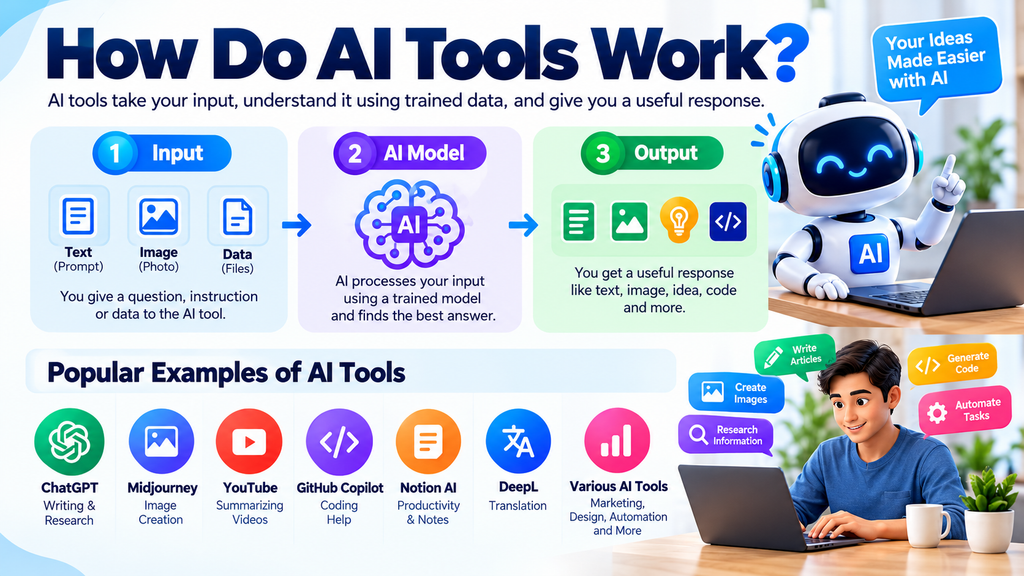
At a simple level, many AI tools follow this basic process:
Input → AI Processing → Output
You provide information or instructions. The AI system processes that input and produces a result.
For example:
Input:
“Create five article ideas about AI tools.”
The AI processes the request and generates possible ideas.
The quality of the result can depend on the information and instructions you provide.
That is why learning how to communicate clearly with AI is an important skill.
AI systems can also make mistakes. They may sometimes generate incorrect information or provide an answer that sounds confident but is not accurate.
For important information, AI output should always be reviewed and verified.
AI Tools vs Traditional Software
AI tools and traditional software are not necessarily competitors. In many cases, they work best together.
Traditional software usually requires users to operate predefined features.
AI tools can often understand natural-language instructions.
For example, instead of manually performing several steps to create content, you could tell an AI tool:
“Create a beginner-friendly outline for an article about AI automation.”
The AI can generate a starting point that you can review and improve.
However, traditional software can still provide precise control that AI tools may not always offer.
A practical approach is:
AI for speed + human control for accuracy and quality.
What Can Beginners Use AI Tools For?
AI is not limited to chatbots.
There are many practical areas where beginners can start using AI.
1. Writing and Content Creation
AI writing tools can help with:
- Brainstorming article ideas
- Creating outlines
- Drafting emails
- Rewriting paragraphs
- Simplifying complicated text
- Creating social media ideas
- Summarizing documents
- Improving grammar
- Changing writing tone
- Generating content variations
For example, instead of asking:
“Write an article about AI.”
you could provide more context:
“Create a beginner-friendly outline for an article about AI tools. The audience is students, freelancers, and small business owners. Use simple English and include practical examples.”
The second prompt gives the AI more context about the task and audience.
A practical writing workflow can be:
Idea → Research → Outline → Draft → Fact-check → Human editing → Publish
AI can assist with the process, but the final content should be reviewed and improved by a human.
2. Image Creation and Editing
AI image tools can generate images from text descriptions and, depending on the tool, modify existing images.
They can be useful for:
- Blog featured images
- Illustrations
- Social media graphics
- Marketing visuals
- Concept images
- Presentation graphics
For example:
Create a clean, modern illustration showing a beginner using AI tools on a laptop, suitable for a technology blog.
When using AI-generated images commercially, always check the specific tool’s licensing and usage terms.
3. Research and Information
AI can help organize and explore information.
For example, if you want to write about AI automation, you can break the topic into smaller questions:
- What is AI automation?
- How is it different from traditional automation?
- What are common use cases?
- What are the benefits?
- What are the limitations?
- What risks should beginners understand?
AI can help you organize these questions and create a research plan.
However, AI-generated research should not automatically be considered verified research.
For important claims, statistics, current information, legal information, financial information, or technical specifications, check the original source.
A strong research workflow is:
AI assistance → Original sources → Verification → Final content
4. Productivity
AI tools can help with everyday productivity.
Examples include:
- Summarizing meeting notes
- Creating task lists
- Organizing ideas
- Drafting emails
- Summarizing long documents
- Planning projects
- Brainstorming solutions
For example, you could provide a list of unorganized notes and ask an AI tool:
“Organize these notes into categories and identify the important action items.”
AI can help transform unstructured information into a more useful format.
5. Coding and Technical Work
AI tools can assist with programming and technical tasks.
Developers can use AI for:
- Explaining code
- Finding possible bugs
- Generating code examples
- Writing documentation
- Creating SQL queries
- Understanding APIs
- Generating test cases
- Explaining technical concepts
- Creating small scripts
Beginners can also use AI as a learning assistant.
For example:
“Explain this Python function to me like I am a beginner.”
However, generated code should always be reviewed and tested before being used in a real project.
Never share private passwords, API keys, or other sensitive credentials with an AI tool.
6. AI Automation
AI automation combines AI capabilities with workflows that perform tasks automatically.
For example:
New form submission → AI categorizes the request → Information is added to a spreadsheet → Notification is sent
Another example:
New content idea → AI creates an outline → Human reviews it → Final article is prepared for publishing
The goal of automation should be to reduce repetitive work and make a workflow more efficient.
A good rule is:
Understand the manual workflow first, then automate the repetitive parts.
7. AI for Business and Marketing
Businesses can use AI tools for:
- Market research
- Content planning
- Marketing ideas
- Customer communication
- Product descriptions
- Data analysis
- Internal documentation
- Lead qualification
- Workflow automation
- Customer support
For example, a small business could use AI to turn product information into several marketing draft variations.
A content creator could use AI to brainstorm video topics.
A business owner could use AI to summarize customer feedback.
The important thing is to start with a real problem rather than simply choosing a tool because it is popular.
What Is a Prompt?
A prompt is the instruction or information you provide to an AI system.
A basic prompt might be:
“Write an article about AI tools.”
A more detailed prompt could be:
“Create a beginner-friendly outline for an article about AI tools. The audience is students, freelancers, and small business owners. Use simple English and include practical examples.”
The second prompt gives the AI more context.
A simple prompt formula is:
Task + Context + Audience + Format + Requirements
You do not need complicated prompt formulas to get started.
The most important thing is to clearly explain:
What do you want the AI to do?
How to Choose the Right AI Tool
There are thousands of AI tools available, and new ones appear regularly.
Instead of asking:
“What is the best AI tool?”
Start with:
“What problem am I trying to solve?”
For example:
If you need help creating blog outlines, look for AI writing or content tools.
If you need to generate images, look for AI image tools.
If you want to automate repetitive tasks, look for AI automation tools.
This problem-first approach makes tool selection easier.
Identify Your Task
Clearly define what you want to accomplish.
For example:
“I need to summarize long research documents.”
This is more useful than:
“I need an AI tool.”
Check the Features
Look at:
- What the tool actually does
- Supported file types
- Integrations
- Usage limits
- Output quality
- Collaboration features
- Export options
Test the Tool
Try the tool with a real task before deciding whether it is useful for you.
Check Privacy
Before uploading documents or sensitive information, understand how the service handles your data.
Check:
- Is your data stored?
- How long is it retained?
- Is your data used for training?
- Who can access it?
- Can you delete your data?
Check Pricing
Compare the free and paid plans and decide whether the additional features are actually useful for your workflow.
Free vs Paid AI Tools
Many AI tools offer both free and paid plans.
Free AI Tools
- Learning AI
- Basic writing
- Simple research
- Experimentation
- Occasional use
Free plans can be useful for:
Paid AI Tools
Paid plans may provide:
- Higher usage limits
- Advanced features
- Additional models
- Team functionality
- Business integrations
- Larger workflows
However:
Paid does not automatically mean better for every user.
Choose a paid plan only when the additional features provide real value for your work.
AI Privacy and Safety
Privacy is one of the most important things beginners should understand before using AI tools.
Avoid sharing sensitive information such as:
- Passwords
- OTPs
- API keys
- Bank information
- Payment credentials
- Private business documents
- Confidential customer information
- Sensitive personal information
Before using an AI service, check its privacy policy and understand how your information is handled.
A simple rule is:
Only provide the information the AI actually needs to complete the task.
Why Should You Verify AI Answers?
One of the biggest mistakes beginners make is assuming that an AI-generated answer must be correct because it sounds confident.
AI can sometimes:
- Generate incorrect facts
- Misunderstand a question
- Provide outdated information
- Misrepresent a source
- Create inaccurate summaries
- Produce plausible but incorrect answers
This is especially important for:
- Health
- Finance
- Legal matters
- Security
- Business decisions
- Current news
For important information, use this process:
AI answer → Check original source → Verify → Use
AI should help you work with information, but it should not replace your judgment.
A Simple AI Learning Roadmap for Beginners
You do not need to learn dozens of AI tools at once.
Start with one practical use case.
Step 1: Understand the Basics
Learn:
- What is AI?
- What is Generative AI?
- What are AI tools?
- What is a prompt?
Step 2: Learn One General AI Assistant
Practice:
- Asking questions
- Brainstorming
- Summarizing
- Rewriting
- Creating outlines
- Research planning
Step 3: Add Specialized Tools
Choose tools based on your work.
For example:
Writer: Writing → Research → Images
Developer: Coding → Research → Automation
Business owner: Research → Marketing → Automation
Step 4: Learn Workflows
Instead of learning individual tools only, learn how different steps can work together.
Step 5: Learn AI Safety
Privacy, verification, security, and human review should become part of your normal AI workflow.
A Practical AI Workflow
A simple AI workflow for beginners can look like this:
1. Identify the problem
2. Choose the right AI category
3. Give clear instructions
4. Review the output
5. Verify important information
6. Edit and improve
7. Use or publish the final result
This approach keeps humans involved in important decisions while using AI where it can save time.
Common Mistakes Beginners Make With AI Tools
Mistake 1: Using AI Without a Clear Goal
Start with the problem you want to solve, not with a random AI tool.
Mistake 2: Trusting Every AI Answer
AI can make mistakes. Verify important information.
Mistake 3: Using Too Many Tools
You do not need dozens of AI tools.
Start with a few tools that solve real problems.
Mistake 4: Sharing Sensitive Information
Never provide passwords, API keys, financial information, or confidential information without understanding how the service handles your data.
Mistake 5: Publishing AI Content Without Editing
AI can help create a draft, but valuable content should be reviewed, fact-checked, edited, and improved by a human.
What Should You Learn After This Guide?
Once you understand the basics, you can explore specific AI categories.
At AIToolsNv, future guides will cover topics such as:
- AI writing tools
- AI image generators
- AI research tools
- AI productivity tools
- AI automation tools
- AI agents
- AI business tools
- AI tools for students
- AI tools for content creators
- AI tutorials
Our goal is not simply to list hundreds of AI tools.
Instead, each guide should explain:
What the tool does → Who should use it → How to use it → Advantages → Limitations → Pricing → Privacy considerations → Practical examples
Frequently Asked Questions
What are AI tools?
AI tools are software applications or online services that use artificial intelligence to help users perform tasks such as writing, research, image generation, coding, analysis, and automation.
Are AI tools useful for beginners?
Yes. Many AI tools use natural-language interfaces, allowing beginners to perform useful tasks without programming knowledge.
Do I need coding skills to use AI tools?
No. Basic AI tools can be used without coding. Programming becomes more useful for APIs, software development, advanced automation, and custom AI applications.
Are all AI tools paid?
No. Many AI tools offer free plans, while others require payment for advanced features or higher usage limits.
Can AI tools replace human work?
AI can assist with or automate many tasks, but the level of automation depends on the specific task. Human judgment remains important for reviewing information and making decisions.
Are AI-generated answers always accurate?
No. AI can generate incorrect or outdated information. Important information should be verified using reliable sources.
Is it safe to put personal information into AI tools?
Not automatically. Different services have different data practices. Users should understand a tool’s privacy policy and avoid sharing unnecessary sensitive information.
How many AI tools should a beginner learn?
There is no fixed number. It is generally more useful to learn a small number of tools that solve real problems rather than trying to use every new AI tool.
What is the best AI tool for beginners?
There is no single AI tool that is best for everyone. The right choice depends on the user’s task, features required, budget, privacy requirements, and workflow.
Conclusion
AI tools are changing the way people write, research, create, code, organize information, and automate repetitive work.
The good news is that you do not need to become an AI expert to start.
Begin with one real problem.
Choose an appropriate AI tool.
Learn how to give clear instructions.
Review and verify the result.
Then gradually build AI into your everyday workflow.
The most useful way to think about AI is not as a replacement for human thinking, but as a tool that can help you work faster, explore ideas, organize information, and handle repetitive tasks more efficiently.
At AIToolsNv, our goal is to make AI easier to understand by sharing practical AI tools, tutorials, guides, automation ideas, AI agents, productivity tips, and useful AI trends.
Start small, learn one workflow, and build from there.