What Is DeepSeek AI? A Beginner’s Guide
Artificial intelligence tools are becoming useful for writing, learning, coding, research, and everyday productivity. Among the many AI tools available today, DeepSeek has attracted attention for its ability to help users with a variety of text-based tasks.
But what exactly is DeepSeek AI? How does it work? What can beginners use it for? And is it suitable for writing, learning, coding, and research?
DeepSeek is an AI system that can respond to natural-language instructions and help users work with information and ideas. Depending on the available model, account, and service features, it may support tasks such as answering questions, explaining concepts, generating text, solving problems, and assisting with code.
In this beginner-friendly guide, you will learn what DeepSeek AI is, how to get started, practical ways to use it, prompt examples, limitations, common mistakes, and tips for using AI responsibly.
1. What Is DeepSeek AI?
DeepSeek AI is an artificial intelligence platform and family of AI models developed by DeepSeek.
It can be used to interact with an AI assistant through natural-language questions and instructions.
For example, a beginner could ask:
“Explain artificial intelligence in simple English and give me three everyday examples.”
The AI can generate a response based on the request.
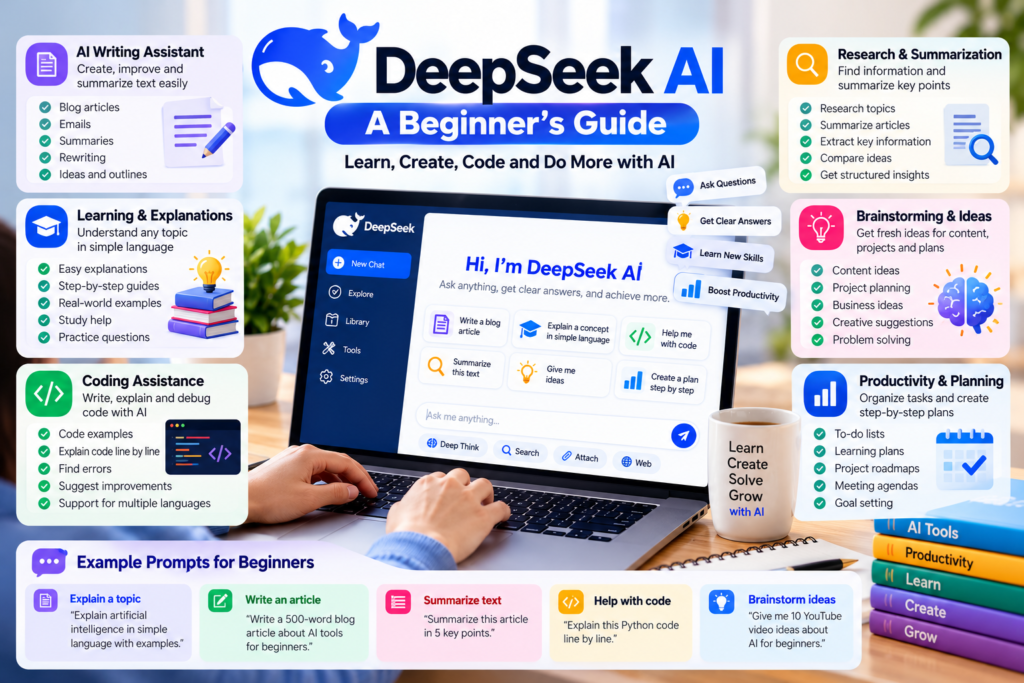
DeepSeek can be useful for tasks such as:
- Writing and rewriting
- Learning and explanations
- Brainstorming
- Coding assistance
- Summarizing information
- Problem solving
- Research support
- Planning and productivity
The exact capabilities available can depend on the model, interface, account, and current product features.
Like other AI systems, DeepSeek should be treated as an assistant rather than an unquestionable source of truth.
2. How Does DeepSeek AI Work?
At a high level, DeepSeek uses AI models trained to process and generate language.
You provide an instruction, question, or prompt. The system analyzes the request and generates a response.
A simple workflow looks like this:
- You enter a question or instruction.
- DeepSeek processes the request.
- The AI generates a response.
- You review the response.
- You ask follow-up questions or improve the prompt if necessary.
For example, instead of asking:
“Write about AI.”
You could provide more context:
“Write a 500-word beginner-friendly explanation of AI tools. Use simple English, clear headings, and practical examples.”
The second prompt gives the AI more information about the expected result.
3. How to Get Started With DeepSeek AI
Getting started does not require advanced technical knowledge.
Step 1: Open DeepSeek
Go to the official DeepSeek website or use an official DeepSeek service or application available to you.
Sign-in requirements and available features can change over time.
Always make sure you are using an official source rather than an unknown website claiming to provide DeepSeek access.
Step 2: Start a Conversation
Once you have access to the interface, look for the option to start a new conversation.
You can begin with a simple question.
For example:
“Explain machine learning to a complete beginner.”
Step 3: Give Clear Instructions
Tell DeepSeek exactly what you want.
For example:
“Explain machine learning in simple English using a real-world example. Keep the explanation under 300 words.”
This gives the AI useful information about the topic, audience, length, and style.
Step 4: Review the Answer
Read the response carefully.
If the answer contains an important fact, statistic, date, technical detail, or recommendation, verify it using reliable sources.
Step 5: Ask Follow-Up Questions
You can continue the conversation to improve your understanding.
For example:
“What is the difference between machine learning and deep learning?”
Then:
“Explain that difference using a simple example.”
This conversational approach can make learning easier.
4. Key Features of DeepSeek AI
The features available in DeepSeek can vary depending on the model, service, and current product updates. However, users may find several useful capabilities.
1. AI Conversation
DeepSeek can respond to natural-language questions and instructions.
You can ask it to explain concepts, brainstorm ideas, rewrite text, or help organize information.
For example:
“Explain blockchain technology as if I am a beginner.”
2. Writing Assistance
AI can help with many writing-related tasks.
For example, you can ask for:
- Article outlines
- Blog introductions
- Email drafts
- Rewriting
- Summaries
- Brainstorming
- Grammar improvements
A useful prompt is:
“Rewrite this paragraph in clear and simple English while keeping the original meaning.”
Always review AI-generated writing before publishing it.
3. Learning and Explanations
DeepSeek can help explain unfamiliar topics.
For example:
“Explain how cloud computing works using a simple real-world example.”
You can then ask additional questions if something is unclear.
AI explanations should be treated as learning assistance. For important academic or professional information, check reliable sources.
4. Coding Assistance
AI models can help users understand and write code.
For example:
“Explain this Python code line by line for a beginner.”
You can also ask for help identifying possible errors.
However, generated code should always be tested and reviewed before being used in a real application.
5. Problem Solving
AI can help break complicated problems into smaller steps.
For example:
“Help me create a simple plan for organizing a small website project. Divide it into tasks and explain what should be completed first.”
The AI can provide a starting point, but you should use your own judgment when making important decisions.
6. Summarizing Information
If supported by the current interface and input format, AI can help summarize supplied text.
For example:
“Summarize the following article in seven bullet points. Highlight the key ideas and important details.”
Always compare summaries with the original material when accuracy matters.

5. Practical Ways to Use DeepSeek AI
DeepSeek can be useful in many everyday situations.
For Students
Students can use AI to understand difficult concepts, create practice questions, and organize study plans.
Example prompt:
“Explain photosynthesis in simple language. Then give me five questions to test my understanding.”
The student should still study the original educational material and follow school or university rules regarding AI use.
For Bloggers
Bloggers can use AI for brainstorming and content planning.
For example:
“Give me ten beginner-friendly article ideas about AI tools. Make each idea practical and suitable for an educational blog.”
AI can help with the initial idea, but the final article should contain original explanations, accurate information, and meaningful value for readers.
For Content Creators
Creators can use DeepSeek to brainstorm video topics, social media ideas, titles, scripts, and content outlines.
Example:
“Create ten YouTube video ideas about AI tools for beginners. Give each idea a short explanation.”
The creator should review and personalize the ideas before publishing.
For Professionals
Professionals can use AI for drafting, organizing information, brainstorming, and preparing plans.
For example:
“Create a simple meeting agenda for a team discussing a new website project.”
Avoid entering confidential company or customer information unless you have confirmed that doing so is permitted and appropriate.
For Programmers
Developers can ask AI to explain code, identify possible bugs, generate examples, or suggest approaches.
For example:
“Explain why this JavaScript function may return an unexpected result and suggest two possible fixes.”
Never assume generated code is automatically secure or correct.
6. DeepSeek AI Prompt Examples
Good prompts usually provide enough context for the AI to understand the task.
Here are some prompts beginners can try.
Prompt 1: Learn a Topic
“Explain artificial intelligence to me as a complete beginner. Use simple English and three everyday examples.”
Prompt 2: Summarize Text
“Summarize this text in five bullet points. Keep the important facts and remove unnecessary details.”
Prompt 3: Improve Writing
“Rewrite this paragraph in clear, professional English while keeping the original meaning.”
Prompt 4: Create an Article Outline
“Create a detailed outline for a beginner-friendly article about AI productivity tools. Include headings, examples, common mistakes, and FAQs.”
Prompt 5: Coding Help
“Explain this code line by line. Assume I am a beginner and point out anything that could cause an error.”
Prompt 6: Brainstorm Ideas
“Give me 15 practical content ideas about artificial intelligence for beginners. Avoid repeating the same topic.”
Prompt 7: Create a Study Plan
“Create a seven-day beginner study plan for learning the basics of artificial intelligence. Give me one practical task for each day.”
Remember that better prompts do not guarantee correct answers. Always review the result.
7. How to Write Better Prompts for DeepSeek
If your first response is not useful, improve your prompt instead of simply repeating the same request.
Be Specific
Instead of:
“Write about AI.”
Try:
“Write a 700-word beginner-friendly explanation of AI tools. Use simple English, five headings, and practical examples.”
Give Context
Tell the AI why you need the information.
For example:
“I am preparing a beginner tutorial for readers who have never used an AI tool.”
Specify the Format
You can request:
- Bullet points
- Tables
- Step-by-step instructions
- Short paragraphs
- FAQs
- Checklists
Define the Audience
For example:
“Explain this topic for a high-school student with no technical background.”
Ask for Limitations
You can ask:
“List the limitations of this approach and identify information that should be independently verified.”
This encourages you to think critically about the response.
8. DeepSeek AI for Coding
One area where AI assistants can be especially useful is programming.
A beginner can use DeepSeek to understand unfamiliar code.
For example:
“Explain this Python function line by line and tell me what each variable does.”
You can also ask:
“Create a simple HTML page with a heading, paragraph, and button. Explain each section of the code.”
For debugging, provide the relevant code and describe the problem clearly.
For example:
“My button does not respond when I click it. Here is the HTML and JavaScript. Explain what might be wrong.”
AI-generated code should always be tested.
For security-sensitive applications, payment systems, authentication, databases, and production software, additional technical review is especially important.
9. DeepSeek AI for Research
AI can help organize research questions and generate starting points for investigation.
For example:
“Give me a list of questions I should investigate before writing an article about AI automation.”
You can then research those questions using reliable primary and secondary sources.
Do not treat an AI response as proof that a claim is true.
For important research, verify information using authoritative sources, official documentation, academic papers, or other trustworthy references.
10. DeepSeek AI vs. ChatGPT
DeepSeek and ChatGPT are both AI assistants, but their capabilities, models, interfaces, tools, and availability can differ.
ChatGPT is designed as a broad general-purpose AI assistant with capabilities that can include writing, brainstorming, coding, analysis, and other tasks depending on the account and available features.
DeepSeek can also assist with conversation, reasoning, writing, coding, and other AI tasks depending on the model and service being used.
Rather than asking which one is universally better, consider which tool works better for your particular task.
For example:
- Use one AI tool for brainstorming.
- Use another for coding assistance.
- Use a research-focused workflow for source verification.
- Compare important outputs when accuracy matters.
AI tools can complement each other.
11. Free and Paid Access
AI services can provide different levels of access depending on their current plans, account type, usage limits, and available features.
A beginner should first understand the available features before deciding whether a paid option is necessary.
Before paying for any AI service, check:
- Current pricing
- Usage limits
- Available models
- Features included
- Data and privacy information
- Cancellation terms
Product features and pricing can change, so always check the official service for the latest information.
12. Limitations of DeepSeek AI
Like other AI systems, DeepSeek has limitations.
AI Can Make Mistakes
An AI response can sound confident while still being incorrect.
Verify important information.
Information May Be Incomplete
The AI may not have the latest information about a topic or may lack important context.
For current information, use reliable up-to-date sources.
AI Can Misunderstand Your Prompt
A vague question can produce an answer that does not match what you actually wanted.
Add context and specify the desired format.
Generated Code May Contain Errors
AI-generated code can fail, contain bugs, or create security problems.
Test and review code before using it.
Privacy Requires Attention
Do not automatically paste passwords, private documents, confidential business information, personal records, or other sensitive data into an AI service.
Check the service’s current privacy information and your organization’s rules before uploading information.
AI Does Not Replace Experts
For medical, legal, financial, security, or other high-impact decisions, AI should not be your only source of information.
Consult an appropriate qualified professional when necessary.
13. Common Mistakes Beginners Should Avoid
Mistake 1: Trusting Every Answer
AI-generated text can look convincing even when it is wrong.
Always verify important claims.
Mistake 2: Using Vague Prompts
A short, unclear prompt often produces a generic response.
Provide context and specific instructions.
Mistake 3: Copying AI Content Without Review
Do not publish AI-generated content without checking it.
Add your own experience, examples, explanations, and useful insights.
Mistake 4: Sharing Sensitive Information
Avoid entering confidential or private information unless you understand the applicable privacy rules and have permission to do so.
Mistake 5: Using AI for Important Decisions Without Verification
AI can support decision-making, but it should not replace qualified advice in high-impact situations.
Mistake 6: Assuming More Detail Means More Accuracy
A long AI response is not automatically a better response.
Focus on accuracy, relevance, and evidence.
14. A Simple Seven-Day DeepSeek Learning Plan
You can learn the basics by practicing one task each day.
Day 1: Ask DeepSeek five simple questions about a topic you already understand.
Day 2: Ask it to explain a difficult concept in simple language.
Day 3: Practice rewriting and summarizing text.
Day 4: Try brainstorming ideas for a project.
Day 5: Experiment with a coding or technical explanation if relevant to you.
Day 6: Compare an AI answer with information from a reliable source.
Day 7: Complete a small project using several prompts and review the final result carefully.
The goal is to learn how to communicate clearly with AI and understand when its output needs verification.
Frequently Asked Questions About DeepSeek AI
1. What is DeepSeek AI?
DeepSeek AI is an artificial intelligence platform and family of AI models that can help users with tasks such as conversation, writing, learning, coding, reasoning, and problem solving.
2. Is DeepSeek AI free?
Access and usage limits can depend on the current DeepSeek service, model, and account. Check the official DeepSeek service for current access and pricing information.
3. Can beginners use DeepSeek?
Yes. Beginners can start with simple questions and gradually learn how to write more detailed prompts.
4. Can DeepSeek help with coding?
Yes. Depending on the model and available features, DeepSeek can help explain code, generate code examples, and troubleshoot programming problems. Generated code should always be tested.
5. Can DeepSeek write articles?
AI can help with outlines, drafts, rewriting, and brainstorming. However, you should review and improve the content, verify facts, and add original value before publishing.
6. Is DeepSeek better than ChatGPT?
There is no single answer for every user. Different AI tools have different models, features, interfaces, and strengths. The best choice depends on the task you want to complete.
7. Can I use DeepSeek for research?
DeepSeek can help brainstorm research questions, summarize supplied information, and organize ideas. Important facts should be independently verified using reliable sources.
8. Should I share private information with DeepSeek?
Be careful with private or confidential information. Before sharing sensitive data, review the service’s current privacy information and make sure you have permission to use the information with the service.
Final Thoughts
DeepSeek AI can be a useful assistant for beginners who want help with writing, learning, coding, brainstorming, research, and everyday productivity.
The best way to learn it is to start with small tasks and gradually experiment with more detailed prompts.
Remember that AI-generated answers are not automatically correct. Verify important information, protect sensitive data, review generated content, and use your own judgment.
When used responsibly, DeepSeek can become another useful tool in your AI toolkit.