What Is Perplexity AI? Beginner’s Guide to AI Search
Introduction
Searching for information online can sometimes take longer than expected. You may need to open several websites, compare different explanations, and check whether the information is reliable.
AI-powered search tools are changing how people explore information. One tool that has attracted attention is Perplexity AI.
Perplexity AI combines conversational AI with web search. Instead of simply showing a list of links, it can generate a response based on information it finds and provide citations to help you explore the original sources.
In this beginner’s guide, you will learn what Perplexity AI is, how it works, how to use it, and where it can be useful. You will also discover its limitations and how it compares with other popular tools.
1. What Is Perplexity AI?
Perplexity AI is an AI-powered answer engine designed to help users search for information and explore topics through natural language questions.
Traditional search engines generally display a list of webpages related to your search. Perplexity AI takes a different approach: it can summarize information into a conversational answer and include links to sources.
For example, instead of searching separately for several articles about renewable energy, you could ask:
“Explain the main types of renewable energy and their advantages.”
Perplexity may provide a structured response with source links that you can open to learn more.
It is useful to remember that an AI-generated answer is not automatically correct. You should still check the cited sources, especially when researching important or complicated subjects.
2. How Does Perplexity AI Work?
Perplexity AI combines language models with information retrieval to respond to questions.
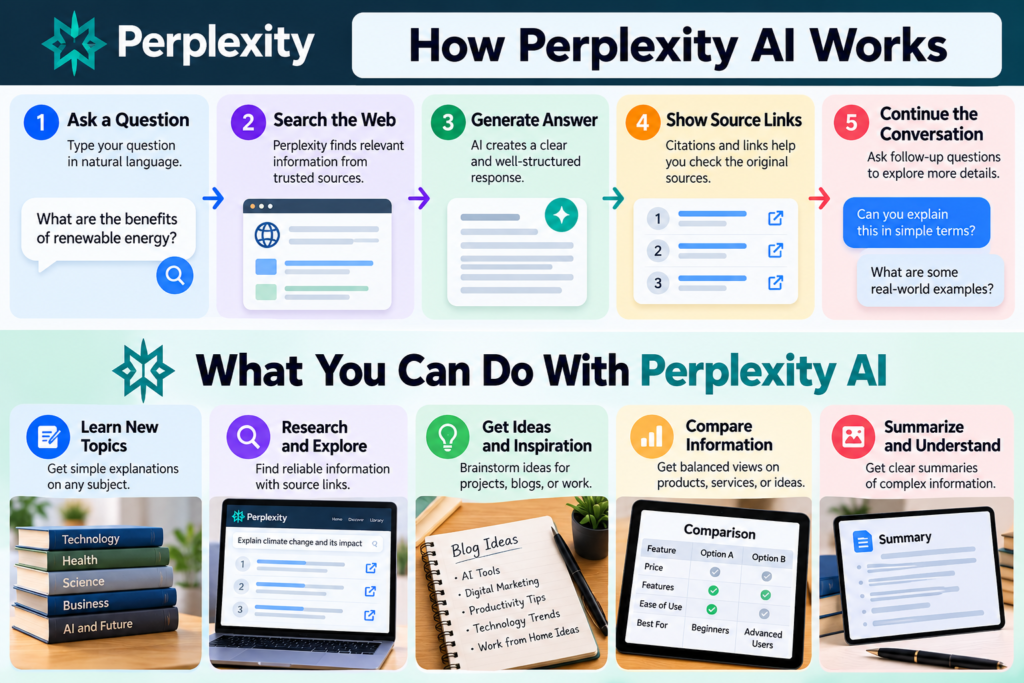
Here is a simplified explanation of the process:
Step 1: Understand Your Question
You enter a question or instruction in everyday language. The system processes your request to identify the topic and the kind of information you need.
Step 2: Find Relevant Information
Depending on the selected mode and available features, Perplexity can search for relevant information from online sources.
Step 3: Generate an Answer
An AI model uses the information available to create a readable response. It may organize the answer into paragraphs, bullet points, or sections.
Step 4: Provide Source Links
The answer can include citations or links to supporting webpages. These links give you a way to inspect the original material.
Step 5: Continue the Conversation
You can ask follow-up questions to explore the subject further without starting a completely new search.
This process can make research more convenient, but it does not remove the need to evaluate information critically.
3. How to Get Started With Perplexity AI
Beginners can start using Perplexity AI by following a few simple steps.
Step 1: Open the Website
Visit the official Perplexity website at https://www.perplexity.ai/.
Step 2: Enter Your Question
Use the search box to type a question in natural language.
For example:
“What are the benefits of learning basic computer programming?”
Step 3: Review the Answer
Read the generated response and look at the citations or source links provided.
Step 4: Open the Sources
Visit relevant sources to confirm important details. Do not rely only on the summary when accuracy matters.
Step 5: Ask a Follow-Up Question
Continue with a more specific question, such as:
“Give me a beginner-friendly example of how programming is used in everyday life.”
Follow-up questions can help you move from a broad topic to more detailed information.
4. Key Features of Perplexity AI
Perplexity AI offers several features that can help users search, learn, and research. The exact features and usage limits may change over time and can depend on your account or plan.
1. Conversational Search
You can ask questions in ordinary language instead of creating short keyword searches.
This can be helpful when you are exploring a topic and are not sure which search terms to use.
2. Source Citations
Perplexity can provide citations and links alongside its answers.
These links can help you:
- Find the original information.
- Compare explanations from different sources.
- Explore a topic in greater depth.
- Check whether a claim is supported by the cited material.
Remember that a citation does not guarantee that the answer accurately represents its source.
3. Follow-Up Questions
You can continue a search with additional questions.
For example, after asking about electric vehicles, you might ask:
“What are the main differences between electric and hybrid cars?”
This conversational approach can make it easier to explore related questions.
4. Research Assistance
Perplexity can help organize information about a subject and provide a starting point for further research.
Students, writers, and professionals may use it to explore unfamiliar topics, discover sources, or develop questions for deeper investigation.
5. Different Search and AI Modes
Depending on the current product and account, Perplexity may provide different modes or model options for particular tasks.
Some options may be designed for more detailed research or specialized workflows. Check the official product interface for the features currently available to your account.
5. What Can You Do With Perplexity AI?
Perplexity AI can be used for many everyday information tasks.
1. Learning New Topics
If you are learning a new subject, ask for a simple explanation.
Example prompt:
“Explain cloud computing in simple language. Give three everyday examples and suggest reliable sources for beginners.”
2. Researching Blog Topics
Bloggers can use Perplexity to explore a topic and discover relevant sources before writing.
Example prompt:
“Give me an overview of current uses of AI in education. Include source links and separate established facts from emerging ideas.”
Always verify facts and write your own original article instead of copying AI-generated responses.
3. Comparing Products and Services
You can ask for a comparison of product features or service options.
Example prompt:
“Explain the main differences between free and paid website hosting for a beginner. List the factors I should compare before choosing.”
For purchases, confirm current prices, terms, and specifications on official websites.
4. Summarizing Information
You can ask for a concise explanation of a complex subject.
Example prompt:
“Summarize the main ideas behind solar energy in five bullet points. Include the advantages and limitations.”
If you provide a document or use a feature that supports file uploads, avoid sharing confidential or sensitive information.
5. Preparing for a Project
Perplexity can help you collect initial information and identify questions to investigate.
Example prompt:
“I am planning a beginner’s website about AI tools. Suggest ten useful research questions and explain what kinds of sources could help answer them.”
Use the output as a starting point and check the facts independently.
6. How to Write Better Perplexity AI Prompts
The quality of a response often depends on how clearly you explain what you need.
Here are some practical ways to improve your prompts.
1. Be Specific
Instead of asking:
“Tell me about AI.”
Try:
“Explain how AI chatbots are used in customer support. Give three examples for small businesses.”
2. Explain Your Goal
Tell Perplexity whether you are learning, comparing, planning, or researching.
Example:
“I am a beginner learning about website SEO. Explain what a sitemap does and why search engines use it.”
3. Request a Useful Format
You can ask for a list, table, step-by-step explanation, or short summary.
Example:
“Compare three common types of renewable energy in a table, including how each works, its advantages, and its limitations.”
4. Ask for Sources
When researching factual topics, request relevant sources and open them to verify the information.
Example:
“Explain the basics of data privacy and provide links to official or authoritative resources.”
5. Ask Follow-Up Questions
If the response is too broad, ask for clarification.
For example:
“Explain the second point with a simple example suitable for a school student.”
Clear prompts and careful source checking can make AI-assisted research more useful.
7. Perplexity AI Free vs. Paid Options
Perplexity has offered free and paid plans, but the features, names, limits, and prices can change.
A free option may be enough for people who want to try conversational search and ask occasional questions.
Paid plans may offer additional capabilities, higher usage limits, or access to more advanced features, depending on the current subscription.
Before subscribing, consider:
- How often you use the tool.
- Which features you actually need.
- Whether the free option meets your requirements.
- The current subscription price and billing terms.
- Whether another tool already provides the features you need.
For the latest plan details, check the official Perplexity website rather than relying on an old price list.
8. Perplexity AI vs. ChatGPT vs. Google Search
These tools can overlap, but they are designed around somewhat different experiences.
Perplexity AI
Perplexity focuses on AI-assisted search and answers with source links. It can be useful when you want an overview of a topic and a path to explore the original sources.
ChatGPT
ChatGPT is a conversational AI assistant that can help with writing, explanations, brainstorming, coding, and many other tasks. Depending on the version and enabled tools, it can also help with web research.
Google Search
Google Search is a traditional web search engine that helps users discover webpages, images, videos, maps, and other content. It gives users direct access to a broad range of search results.
Which One Should You Use?
The right tool depends on your task.
- For exploring a topic with AI-generated summaries and citations, you might try Perplexity.
- For drafting, brainstorming, learning through conversation, or working through a task, you might try ChatGPT.
- For finding specific websites, official pages, local information, and a wide variety of web results, you might use Google Search.
You can also use more than one tool and compare their results. No single tool should be treated as a perfect source of truth.
9. Limitations of Perplexity AI
Although Perplexity AI can make searching more convenient, it has limitations.
1. Answers Can Be Incorrect
AI-generated responses may contain errors, misunderstandings, or outdated information.
Check important claims against reliable sources.
2. Citations Need Verification
A cited webpage may not fully support the statement next to it. Open the source and confirm that it says what the answer claims.
3. Some Information May Be Outdated
Online information changes. This is particularly important for prices, product features, laws, and current events.
Check the date and relevance of the sources you use.
4. Access and Usage May Be Limited
Some features may require a particular plan, account, or supported device. Usage limits can also change.
5. It Does Not Replace Expert Advice
For important medical, legal, financial, or safety-related decisions, use qualified professionals and authoritative sources rather than relying solely on an AI answer.
10. Common Mistakes Beginners Should Avoid
New users can get more useful results by avoiding a few common mistakes.
- Asking overly broad questions: Narrow the topic and explain what you want to learn.
- Trusting every answer: Verify important facts with the original sources.
- Ignoring publication dates: Check whether the information is current.
- Copying AI content directly: Use AI for research assistance, then create original writing and check all claims.
- Sharing private information: Avoid entering passwords, personal records, confidential business details, or other sensitive data.
- Assuming paid plans are always necessary: Try the available free features first and identify your actual needs.
11. Frequently Asked Questions
1. What is Perplexity AI used for?
Perplexity AI is used for conversational search, exploring topics, finding source links, summarizing information, and supporting early-stage research.
2. Is Perplexity AI free?
Perplexity has offered a free way to use its service, along with paid plans. Available features and limits may change, so check its official website for current details.
3. Is Perplexity AI better than Google Search?
They provide different experiences. Perplexity can generate conversational answers with citations, while Google Search provides a broad set of webpages and other results. The more suitable option depends on what you are trying to find.
4. Can Perplexity AI help students?
It can help students explore unfamiliar topics, find starting points for research, and generate explanations. Students should verify sources and follow their school’s rules for AI use.
5. Can Perplexity AI write articles?
It can help organize research and generate draft text. Writers should independently verify facts, add their own insights, and ensure that the final article is original and useful to readers.
6. Does Perplexity AI always provide correct sources?
No. Citations can be incomplete, irrelevant, or misrepresented. Open the original sources and check whether they support the claims.
7. Can I use Perplexity AI in Hindi?
You can try asking questions in Hindi. The quality and availability of language support may vary by task and feature.
Final Thoughts
Perplexity AI is an AI-powered search tool that can help people explore questions, understand unfamiliar subjects, and discover sources for further reading.
Its conversational answers and source links can make initial research more convenient. However, users should remember that AI-generated summaries can contain mistakes and that citations need to be checked.
If you are new to AI search, start with a simple question, review the sources, and ask follow-up questions to explore the topic more deeply.
Used thoughtfully, Perplexity AI can become a helpful addition to your research and learning workflow.